Choosing the best budget studio monitors is essential for anyone looking to create a reliable studio setup without breaking the bank. When shopping for budget studio monitors, you can expect to spend anywhere from $100 to $300 per pair, making money and price key considerations as you evaluate your options. Whether you’re a beginner mixing your own music or a seasoned mix engineer setting up a budget studio, finding powered studio monitors that deliver clarity, accuracy, and a wide frequency range at a relatively low cost can significantly impact your music production experience. In this guide, we explore everything you need to know about budget studio monitors, from frequency response and speaker placement to acoustic treatment and popular features, while helping you balance what you spend with the features and performance you get for the price.
What are Budget Studio Monitors?
Budget studio monitors are speakers designed to provide accurate and reliable sound reproduction without the high price tag associated with professional-grade monitors. They are essential tools for anyone setting up a home or project studio on a limited budget, enabling producers, mix engineers, and musicians to hear their music clearly and make informed mixing decisions. Unlike typical consumer speakers or computer speakers, budget studio monitors aim to deliver a flat frequency response, meaning they reproduce sound as neutrally and faithfully as possible, without artificially boosting bass, mids, or highs. Most studio monitors are designed for nearfield use to reduce room acoustics interference during mixing. This neutrality is crucial for achieving mixes that translate well across various playback systems, from headphones to car stereos. Mixes produced on overly colored monitors can lead to poor translation on other sound systems, making neutrality even more important.
While budget studio monitors may not offer all the advanced features or the same level of detail as high-end reference monitors found in professional recording studios, many models today provide impressive performance for their price. Advances in technology have allowed manufacturers to include features like built-in amplifiers, DSP room correction, and versatile connectivity options even in affordable monitors. These improvements mean that budget studio monitors can be a practical and effective choice for both beginners and experienced mix engineers working in smaller or untreated rooms. The Kali Audio LP-6 is often identified as the best value studio monitor in many guides, offering a combination of affordability and performance that appeals to a wide range of users.
Types of Studio Monitors: Active vs. Passive and More
Active Studio Monitors
When building your studio setup, understanding the different types of studio monitors is key to making the right choice for your music production needs. The most common option in modern studios is the active (powered) studio monitor, such as those offered by Adam Audio. Active monitors have built-in amplifiers, which means you simply connect them to your audio interface or mixer and you’re ready to go—no need for external amplification. The Adam Audio T5V provides excellent stereo imaging and wide sweet spots for listening, making it a popular choice for home studios. This all-in-one design makes active monitors especially popular for home studios and anyone seeking a straightforward setup.
passive studio monitors
Passive studio monitors, on the other hand, require a separate amplifier to function. While this adds flexibility in choosing your own amp and can appeal to audio purists, it also introduces more complexity and potential cost to your studio. For most music producers, especially those working with a budget, active studio monitors are the preferred choice due to their convenience and reliable performance. For example, the KRK Rokit 5 G5 is recognized for its bass-heavy sound, appealing to certain genres like hip-hop and EDM, which makes it a popular option for producers in these styles. The Yamaha HS5 studio monitors are popular among producers but are often criticized for their mixes sounding dull or unclear, which can be a drawback for those seeking accurate mix translation. The Yamaha HS5 is often criticized for not translating mixes well due to its boosted upper midrange. Many studio monitors feature EQ controls to adjust frequency response for specific room acoustics, further enhancing their versatility.
Driver Configurations and Designs
Beyond amplification, studio monitors also differ in their driver configurations. two-way monitors use a woofer and a tweeter to handle low and high frequencies, while three-way monitors add a dedicated midrange driver for even greater clarity across the frequency spectrum. Coaxial designs place the tweeter and woofer on the same axis, improving phase coherence and imaging. The Kali Audio LP-6 V2 are noted for their neutral sound reproduction, making them a strong contender for those seeking accurate sound on a budget. The Kali Audio LP-6 V2 studio monitors provide transparent sound and are ideal for mixing, offering excellent value for their price. The right configuration depends on your studio size, the genres you work with, and your personal preferences, but understanding these options will help you select monitors that sound good and suit your music production workflow.
Key Features to Look for in the Best Budget Studio Monitors
Frequency Response and Tonal Balance
Look for monitors that offer a flat frequency response across the low end, low mids, upper mids, and top end. This ensures you can accurately hear and mix all elements of your music.
Bass Drivers and Woofer Size
Smaller monitors often have smaller woofers, which might limit bass frequencies. However, with proper acoustic treatment and speaker placement, even smaller monitors can sound good in a budget studio setup. Accurate reproduction of low frequencies is crucial for mix translation, ensuring your mixes sound balanced on different playback systems.
Powered Studio Monitors
Choosing powered monitors simplifies your setup by eliminating the need for external amplifiers, making it easier to integrate into your existing studio.
Sound Clarity and Accuracy
The goal is to have monitors that sound clear and reveal details in your recording, helping you make informed mixing decisions. Good monitors make certain elements, such as vocals or high frequencies, more present in the mix, allowing you to clearly hear the details in your mixed tracks. Higher wattage provides better headroom to handle dynamic instruments without clipping, ensuring that your mixes remain clean and distortion-free even at higher volumes.
Relatively Low Cost
Since budget is a key factor, seek monitors that balance cost with performance, offering the best value without compromising essential features.
Connectivity Options
Check the input options available on the monitors to ensure compatibility with your audio interface or mixer. Common connections include XLR, TRS, and RCA. Some budget monitors also offer USB or Bluetooth connectivity for added versatility. Connectivity options such as Bluetooth and USB-C are increasingly common in modern studio monitors, providing more flexibility for integrating with various devices.
Build Quality and Durability
Even on a budget, it’s important to select monitors with solid construction to withstand regular use. Durable cabinets and quality components contribute to consistent sound performance over time. Build quality is often better in high-end studio monitors, making them more durable over time compared to budget options.
Room Calibration Features
Some modern budget studio monitors include built-in DSP and room correction features, which can help compensate for less-than-ideal room acoustics. This technology can improve accuracy and reduce the need for extensive acoustic treatment.
Size and Placement Flexibility
Consider the physical size of the monitors relative to your studio space. Compact monitors are ideal for smaller rooms or desktop setups, while larger monitors provide greater bass response but require more space.
Top Budget Studio Monitors
Adam Audio T5V

- Bundle Includes: Adam Audio T5V 5-Inch Powered Studio Monitor (2-Pack...
- Acoustic Adjustments: Allows optimal adaptation to acoustically difficult...
- 1.9-Inch Accelerated Ribbon Tweeter: Advanced dynamic range due to...
The Adam Audio T5V studio monitors are a standout choice among the best budget studio monitors, offering impressive sound quality at around $350 for a pair. These powered studio monitors feature a 5-inch woofer and Adam Audio’s signature U-ART ribbon tweeter, which delivers clear, detailed high frequencies and wide stereo imaging. The T5V’s frequency response spans from 45 Hz to 25 kHz, providing a wide frequency range suitable for various music production needs.
One of the key strengths of the Adam Audio T5V is its ability to maintain clarity and accuracy across the frequency spectrum, making it easier for mix engineers and producers to hear the nuances in their music. The ribbon tweeter design contributes to a smooth and extended top end, reducing listening fatigue during long mixing sessions. Additionally, the T5V offers versatile connectivity options, including XLR and RCA inputs, allowing seamless integration into most studio setups.
These monitors are well-suited for both beginners and experienced users looking for reliable reference monitors without a hefty price tag. While the T5V may not have the deepest bass response compared to larger monitors, its balanced tonal output and precise imaging make it an excellent choice for small to medium-sized rooms. Proper speaker placement and acoustic treatment in the listening room can further enhance the T5V’s performance, ensuring accurate monitoring and mix translation.
Kali Audio LP-6 V2

- Superior Sonic Accuracy - The 2nd gen LP-6 studio monitor has a more robust...
- No Chuffing & Hissing - Enjoy clear sounds with our studio audio monitors...
- Superb Sound in Any Setup - Our powered monitors feature an updated...
Kali Audio LP-6 V2 studio monitors have earned a strong reputation among best budget studio monitors for their remarkable neutrality and transparency. Designed with mix engineers and music producers in mind, these monitors deliver a flat frequency response that allows you to hear your mixes exactly as they are, without artificial coloration. This transparency is essential for making accurate mixing decisions that translate well across different playback systems.
Featuring a 6.5-inch woofer and a 1-inch textile dome tweeter, the LP-6 V2 covers a wide frequency range from 39Hz to 25kHz. This broad frequency response ensures you can clearly hear everything from deep bass frequencies to shimmering high-end details. The woofer size strikes a good balance between providing solid low-end response and fitting comfortably in smaller studio spaces, making these monitors suitable for a variety of room sizes.
One of the standout features of the LP-6 V2 is its front-firing bass port, which allows for placement closer to walls without causing excessive bass buildup. This design consideration is especially beneficial for home studios where space is limited and ideal speaker placement can be challenging. Additionally, the LP-6 V2 includes boundary EQ settings that let you tailor the monitor’s response to your specific room environment, helping to compensate for acoustic anomalies and improve overall sound accuracy.
Connectivity options include balanced XLR, balanced TRS, and unbalanced RCA inputs, ensuring compatibility with most audio interfaces and mixers. This versatility makes the LP-6 V2 a practical choice for users with diverse studio setups.
JBL Professional 305PMkII
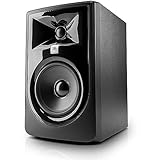
- 1 Speaker. JBL 305P MkII undergoes a rigorous 100-hour full-power test to...
- Featuring patented technologies derived from the JBL Master Reference...
- New boundary EQ: restores neutral low frequency response when speakers are...
The JBL Professional 305PMkII studio monitors are a popular choice among best budget studio monitors, offering impressive performance at an affordable price point. These powered studio monitors feature a 5-inch woofer and a 1-inch tweeter, delivering a frequency response range of 43 Hz to 24 kHz. This wide frequency range ensures that you can hear both deep bass frequencies and crisp high frequencies clearly, making them suitable for a variety of music production tasks. The JBL 305P Mk2 studio monitors are known for being good full-sized monitors for under $300, making them an excellent option for budget-conscious users.
One of the standout features of the 305PMkII is JBL’s patented Image Control Waveguide technology, which provides a detailed and accurate stereo image with a wide sweet spot. This technology helps mix engineers and producers hear precise spatial placement of instruments and vocals, enhancing the critical listening experience. The monitors also offer low distortion levels, ensuring clarity and accuracy across the frequency spectrum.
Connectivity options include balanced XLR and TRS inputs, allowing seamless integration with most audio interfaces and mixers commonly found in budget studio setups. The compact design of the 305PMkII makes them a great fit for smaller rooms or desktop setups where space is limited. The JBL 305P Mk2 is recognized for its excellent performance in the super budget category, offering a balance of affordability and quality that appeals to both beginners and experienced users.
While these monitors deliver a solid low-end response for their size, pairing them with proper acoustic treatment in the listening room can further improve bass accuracy and overall tonal balance. The JBL 305PMkII is well-suited for beginners and intermediate users who need reliable, accurate monitoring without a hefty investment, making them a strong contender in the category of best budget studio monitors.
PreSonus Eris E3.5

- There is a newer model of this item available Gen 2 (2024) Eris 3.5
- The only true studio monitor for multimedia, gaming, watching movies, or...
- Now comes included with Studio One Prime and Studio Magic plug-in suite...
PreSonus Eris E3.5 studio monitors are an exceptional entry-level option for those seeking the best budget studio monitors without sacrificing sound quality. Priced under $100 for a pair, these compact powered studio monitors pack a surprising amount of performance into a small form factor, making them ideal for beginners and home studio setups with limited space.
Featuring a 3.5-inch Kevlar woofer and a 1-inch silk dome tweeter, the Eris E3.5 offers a frequency response range of 80 Hz to 20 kHz. While the bass response is naturally limited due to the smaller woofer size, these monitors excel at delivering clear mids and highs, which are critical for accurate mixing and critical listening. The silk dome tweeter ensures smooth and detailed high frequencies without harshness, allowing you to hear subtle nuances in your recordings.
Connectivity options include balanced TRS and unbalanced RCA inputs, providing flexibility for different audio interfaces and mixers. The Eris E3.5 also features acoustic tuning controls on the back, allowing you to adjust the low and high-frequency response to better suit your room’s acoustics or personal preferences. This is particularly useful in untreated or smaller rooms where reflections and standing waves can affect sound accuracy.
Despite their budget-friendly price, the build quality of the Eris E3.5 is solid, with durable enclosures and well-constructed drivers that stand up to regular use. Their compact size makes them perfect for desktop setups, and they can be easily paired with subwoofers if you require extended low-end response.
Proper Setup for Budget Studio Monitors
Proper setup is just as important as the monitors themselves. To get the best sound from your budget studio monitors, consider the following:
Speaker Placement
Position your monitors to form an equilateral triangle with your listening position, ensuring the tweeters are at ear level. This placement helps you hear a balanced frequency spectrum and reduces phase issues.
Listening Room and Acoustic Treatment
Most people overlook the impact of the room on sound quality. Acoustic treatment helps control standing waves and reflections, which can color the sound and affect your perception of bass and clarity.
Listening Position
Your ears should be at the sweet spot, equidistant from each monitor, to experience the stereo image and tonal balance accurately. Make sure to listen critically from this position to assess stereo imaging and tonal balance.
When setting up your monitors, it’s important to listen at both quiet and loud volumes to evaluate their performance and ensure they meet your needs. You may have listened to different monitors in your setup to compare their sound and make an informed decision. Proper monitor setup is crucial for achieving accurate monitoring when you record music in your studio.
Room Size and Monitor Size Matching
Consider the size of your room when choosing and placing your monitors. Smaller rooms often benefit from smaller monitors, as larger bass drivers can produce excessive low frequency energy that causes muddiness. Matching the monitor size to your room helps maintain clarity and prevents overwhelming bass frequencies.
Avoiding Wall Reflections
If possible, keep your monitors away from walls, especially if they have rear bass ports. Placing monitors too close to walls can cause bass frequencies to build up unnaturally, leading to inaccurate low end reproduction. Using front-ported monitors or placing bass traps in corners can help mitigate this issue.
Use of Isolation Pads or Monitor Stands
Placing your monitors on isolation pads or dedicated stands can reduce vibrations and prevent unwanted resonance from your desk or furniture. This isolation improves clarity and reduces muddiness in the sound.
Calibration and EQ Adjustments
Some budget studio monitors offer built-in EQ controls or room correction features. Use these to fine-tune the frequency response according to your room’s acoustic characteristics. Alternatively, software-based room correction tools can also help improve accuracy.
Regular Reassessment
Over time, your room setup or monitor placement might change. Regularly reassess your monitoring environment and make adjustments as needed to maintain optimal sound quality.
Conclusion
Finding the best budget studio monitors involves balancing cost, sound quality, and the specific needs of your studio space. By focusing on features like frequency response, powered design, and proper speaker placement, you can create a listening room that supports critical listening and accurate mixing. Brands like Adam Audio and IK Multimedia offer excellent options for those seeking performance at a relatively low cost. Ultimately, investing in quality budget studio monitors is a crucial step toward producing music that sounds great across all systems and environments.
FAQ
What are the best budget studio monitors for beginners?
For beginners, the best budget studio monitors are those that provide a flat and accurate frequency response without breaking the bank. Popular options include the Adam Audio T5V, known for its clear sound and ribbon tweeter, the Kali Audio LP-6 V2 for its neutral and transparent sound, the PreSonus Eris E3.5, which offers excellent value at a very low cost, the JBL 305P Mk2, recognized for its solid performance under $300, and the KRK Rokit 5 G5, favored for its bass-heavy sound appealing to certain genres. These monitors help new producers hear their mixes accurately and develop critical listening skills.
How important is acoustic treatment when using budget studio monitors?
Acoustic treatment is crucial regardless of your monitor’s price point but especially important when using budget studio monitors. Even the best monitors can sound misleading in untreated rooms due to reflections, standing waves, and bass buildup. Proper acoustic treatment, such as bass traps and acoustic panels, helps create a more accurate listening environment, ensuring that the monitors’ flat frequency response is not compromised by room acoustics.
Can I use budget studio monitors for professional mixing?
While budget studio monitors may not offer the same level of detail and accuracy as high-end models, many provide sufficiently flat frequency response and clarity to be used for professional mixing, especially in smaller or home studios. With proper room treatment and calibration, budget monitors from reputable brands like Adam Audio and Kali Audio can deliver reliable results and help produce mixes that translate well to other systems.
Should I choose active or passive studio monitors?
Active (powered) studio monitors are generally recommended for most users, particularly those on a budget. They have built-in amplifiers, which simplifies setup and ensures optimal matching between the amplifier and speakers. Passive monitors require an external amplifier, adding complexity and cost. Active monitors like the Adam Audio T5V are convenient and widely used in home and project studios.
How do I position my budget studio monitors for the best sound?
Position your monitors so that they form an equilateral triangle with your listening position, with the tweeters at ear level. Avoid placing monitors directly against walls if they have rear bass ports, as this can cause bass buildup. Use monitor stands or isolation pads to reduce vibrations and reflections from your desk. Proper speaker placement helps achieve balanced tonal response and accurate stereo imaging.