Would a dedicated music player make listening easier—or simply add another device to your pocket?
A digital audio player (DAP) gives your music its own battery, storage, controls, and headphone connections. This guide focuses on portable players for streaming services and local music files, not desktop streamers or standalone DAC dongles.
The best choice depends less on impressive chipset numbers than on how you listen. Android players suit streaming subscriptions; smaller, closed-system players suit microSD libraries and distraction-free listening. The five models below cover those needs, although current new-unit pricing, availability, firmware, and return terms should be confirmed before purchase.
Top DAPs Under $500
FiiO M21

- A Brand-New Processor That Surpasses Competing Products — Qualcomm...
- Patented Desktop Mode with 950mW High Power Output: When Desktop Mode is...
- Quad CS43198 Matrix DACs, Fully Balanced 2-Stage Amplification: Featuring a...
The FiiO M21 is the strongest all-round option here for someone who wants streaming apps, expandable storage, and useful headphone-driving flexibility without moving into flagship territory. Its advantage is versatility—not simply the number of DAC chips inside.
FiiO specifies Android 13, a Snapdragon 680 processor, 4GB of RAM, and 64GB of internal storage. That configuration provides more breathing room for app switching and downloaded music than the entry-level JM21 configuration discussed below. A microSD slot handles a larger local library, while the 4.7-inch touchscreen leaves enough space for streaming-app navigation.
Both 3.5mm single-ended and 4.4mm balanced headphone outputs are included. Start with the connection your headphones already use rather than buying a balanced cable automatically. Sensitive in-ear monitors generally need sensible gain and volume settings more than maximum output.
The M21’s distinctive extra is its externally powered Desktop Mode. This makes it useful on a desk as well as during a commute, although its highest-power operating conditions should not be confused with ordinary battery-powered playback. USB DAC functionality also allows it to handle audio from a compatible computer.
FiiO advertises approximately 15 hours of playback under its specified single-ended test conditions. Streaming, balanced output, processing, and frequent screen use can shorten that figure. At roughly 193g, it is portable but noticeably heavier than the compact players below.
Key advantages:
- Android flexibility for streaming and local playback.
- More memory and storage than the basic JM21.
- Practical portable and desk-based operating options.
Main drawback: Its size and additional features are unnecessary if you only want straightforward file playback.
Verdict: Choose the M21 if one player must cover streaming, a substantial local collection, and different wired headphones. It offers the most balanced feature set here, rather than a guaranteed audible upgrade over every cheaper alternative.
HiBy R4

- This MP3 & MP4 player, equipped with the SD665 octa-core processor and...
- Discover the HiBy R4, a true HiFi MP3 player featuring 4 DAC chips...
- This Hi res Audio Player supports playback of up to DSD 256native...
The HiBy R4 is particularly appealing if adjusting headphone tuning matters more to you than having the smallest player. Its combination of Android app support and extensive audio processing gives it a clear purpose beyond simply playing high-resolution files.
The standard R4 uses Android 12, a Snapdragon 665 processor, 3GB of RAM, and 32GB of internal storage. A microSD slot expands music storage, while the 4.7-inch display accommodates streaming interfaces and detailed playback settings. Its 3.5mm and 4.4mm outputs support conventional and balanced headphone cables.
HiBy’s MSEB processing provides descriptive adjustments such as warmth and vocal presentation. Parametric equalization offers a more technical approach, allowing targeted changes to frequency, gain, and bandwidth. These controls can make a meaningful difference when correcting an overly bright headphone or adjusting bass to personal preference.
The important distinction is scope. The R4 offers system-level processing options, while HiBy Music also has its own playback controls. An effect enabled inside an app should not automatically be assumed to affect every other app, USB output, Bluetooth connection, or native DSD playback mode. Check the selected processing menu and output path.
HiBy specifies up to roughly 11 hours of playback under its test conditions. Its Class A amplification also makes heat and battery consumption relevant considerations. At approximately 231g, this is the heaviest recommendation here, and its angular design will not suit every pocket.
Key advantages:
- Extensive tuning options for listeners who actively use EQ.
- Native Android streaming apps rather than Bluetooth reception alone.
- Balanced and single-ended headphone connections.
Main drawback: Weight, warmth, and battery demands reduce its appeal as a minimalist commuting player.
Verdict: Choose the R4 if you want a dedicated platform for headphone tuning and streaming. Its customization tools are the reason to buy it; listeners who prefer untouched playback may find a simpler player more convenient.
FiiO JM21

- The world's first Snapdragon 680 portable HiFi player JM21: The Qualcomm...
- Custom Android 13 open-source system: The deeply customized Android...
- Dual flagship DACs, CS43198, with a powerful 700mW output drive: The JM...
The FiiO JM21 makes the most sense when you want a dedicated player with streaming apps but do not need to spend your entire budget. It retains the essential Android DAP experience while cutting back on memory, storage, and some of the M21’s additional hardware features.
The configuration considered here is the 3GB RAM/32GB storage version. Other variants may appear in listings, so check the exact specification rather than assuming every JM21 has the same memory allocation.
FiiO specifies Android 13 and a Snapdragon 680 processor, along with a 4.7-inch touchscreen. Spotify, TIDAL, Qobuz, and Apple Music are the relevant native-app use cases, subject to each service’s current Android requirements and installation availability. Offline downloads remain controlled by the individual app and subscription.
The JM21 includes both 3.5mm single-ended and 4.4mm balanced outputs, plus microSD expansion. That combination is important: choosing the lower-priced model does not mean abandoning a large local collection or balanced headphones.
Its approximately 156g weight makes it easier to carry than the M21 or R4. Manufacturer battery claims reach around 12.5 hours through the single-ended output under specified conditions; balanced playback and Wi-Fi activity can reduce runtime.
The compromise is headroom in everyday operation. Three gigabytes of RAM leaves less space for multitasking, and 32GB of internal storage fills quickly once apps, updates, and downloads accumulate. Keeping only necessary apps installed is sensible.
Key advantages:
- Lower-cost access to a full Android music workflow.
- Lightweight construction for an app-capable player.
- Both major headphone connections and expandable storage.
Main drawback: Limited RAM and internal storage require more disciplined app and download management.
Verdict: Choose the JM21 if streaming flexibility matters more than premium construction or desk-oriented features. For efficient headphones and straightforward listening, the savings may be more valuable than moving up to a more elaborate player.
Shanling M1 Plus

- Utilizing the latest MTouch system on Ingenic X2000 processor, M1 Plus...
- Sandwiched into a compact body made of aluminium and glass, adapting the...
- Audio circuit based around ESS ES9069Q DAC for dynamic and detailed sound...
The Shanling M1 Plus suits listeners who want something smaller than a phone-shaped Android player without giving up a usable touchscreen or a modern balanced connection. It is particularly attractive as a compact DAP for commuting with a prepared music library.
Shanling specifies a body measuring approximately 86 × 61 × 17mm, a weight of around 116g, and a 3.2-inch touchscreen. Those dimensions make it substantially shorter than the larger Android recommendations, although its thickness still matters in a tight pocket.
Physical playback controls and a volume wheel reduce the need to wake the screen for routine adjustments. That is a practical advantage on public transport or when walking: pausing a track should not require navigating a streaming interface.
The M1 Plus runs Shanling’s MTouch operating system rather than general-purpose Android. It therefore should not be purchased as an unrestricted platform for installing Spotify, Apple Music, or whichever app becomes popular next. Any integrated online service or network feature is separate from full Android app compatibility and should be checked against the current firmware.
For local listening, the player combines microSD storage with 3.5mm single-ended and 4.4mm balanced outputs. Shanling lists support for common lossless formats, including FLAC and ALAC, and advertises playback of up to approximately 12.5 hours under its test conditions.
The smaller display creates an unavoidable compromise. Album browsing and settings remain possible, but entering searches or managing complex playlists is less comfortable than on a larger Android screen.
Key advantages:
- Compact dimensions with useful physical controls.
- A 4.4mm balanced output without a large chassis.
- A focused interface for an existing music collection.
Main drawback: Closed-system software limits app choice and future streaming flexibility.
Verdict: Choose the M1 Plus if pocketability and local playback outweigh app installation. It occupies a useful middle ground between tiny touchscreen players and larger Android devices.
Hidizs AP80 Pro Max
- Dual ESS ES9219C DACs for Superior Sound Quality: Featuring dual ESS...
- 2.4GHz WiFi Connectivity for High-Resolution Streaming: Enjoy seamless...
- Advanced Bluetooth 5.1 for Seamless Audio Experience: Equipped with...
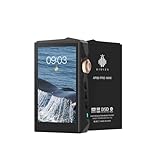
The Hidizs AP80 Pro Max is the most focused recommendation here: a small portable music player for local FLAC files, everyday MP3 collections, and listeners who want to leave their phone out of the playback process.
At approximately 72g, it is markedly lighter than the Android options. Hidizs specifies a 2.45-inch touchscreen, a physical volume control, and playback buttons. Those controls help compensate for a display that is too small for comfortable, extended library administration.
The AP80 Pro-X uses a closed operating system. You cannot install conventional Android streaming apps. Bluetooth reception can let it receive audio from another device, but that still depends on the transmitting phone or computer. It is not equivalent to independently running Spotify or downloading an Apple Music library.
Music is stored on microSD rather than a large internal music drive. Hidizs lists card support up to 512GB for this model; use the manufacturer’s documented capacity rather than assuming newer, larger cards are fully supported.
The local player includes tag-based browsing, gapless playback, and playlist functionality. Imported playlist paths and large-library scanning deserve attention, however. A neatly organized card and a short trial playlist are better starting points than transferring an entire collection and hoping everything indexes correctly.
Headphone connections are 3.5mm single-ended and 2.5mm balanced, not 4.4mm. The smaller balanced connector is a legacy format and may require a different cable. Manufacturer playback claims are approximately eight to eleven hours, depending on operating conditions.
Key advantages:
- Very low weight and genuine pocketability.
- Dedicated controls for simple daily playback.
- Local lossless playback without an Android app environment.
Main drawback: No installable streaming apps, plus a small screen and older balanced connector.
Verdict: Choose the AP80 Pro-X if your music already lives on microSD and minimal bulk matters most. Avoid it if your listening revolves around subscription downloads or frequent on-device library editing.
Choosing a DAP Under $500
Choose a player around your listening routine first, then check the technical details that could prevent it from working well with your music and headphones.
Streaming-App Compatibility
For a DAP with streaming apps and offline downloads, Android is usually the most flexible starting point. A closed operating system can support selected online features, but Wi-Fi alone does not establish native app compatibility.
Check each service separately:
- Spotify: Confirm installation, account login, and offline downloads with an eligible subscription.
- TIDAL: Check the current Android requirement and download settings; older integrated implementations are not interchangeable with the current app.
- Qobuz: Confirm app installation and available offline-storage locations.
- Apple Music: Verify the Android app’s installation route, login behavior, and download settings.
Google Play Store access simplifies installation, but app availability can still depend on device certification, region, firmware, and service requirements. Sideloading an APK is not a guarantee of reliable operation or future updates.
Before committing to a player, work through this compatibility checklist:
1. Confirm that your preferred service runs natively.
2. Check whether your subscription includes offline listening.
3. Verify where downloaded music can be stored.
4. Confirm that downloads remain accessible after restarting.
5. Check the manufacturer’s recent firmware history.
Streaming subscriptions usually require periodic online authorization. Downloaded tracks are also app-managed files, not permanent additions to your transferable music collection.
Wi-Fi reliability matters as much as theoretical connection speed. A player that works acceptably beside the router may behave differently through several walls. Test your normal listening location during the return window, including playback with the screen off.
Headphone and IEM Matching
A suitable player should provide enough clean output for your headphones without making sensitive in-ear monitors hiss or become difficult to control at low volume.
Sensitivity describes how loudly a headphone plays for a given input. Impedance describes its electrical load, but the two must be considered together. A low-impedance planar headphone can still require substantial power, while some higher-impedance headphones are comparatively easy to drive.
Sensitivity figures also use different units. A rating in dB/mW cannot be compared directly with one in dB/V without conversion.
For sensitive IEMs, prioritize:
- A low noise floor.
- A genuinely useful low-gain setting.
- Fine volume adjustment near the bottom of the range.
- Low output impedance, particularly with multi-driver designs.
A player’s output impedance can interact with a headphone’s changing impedance and alter frequency response. As a rough guide, a substantially lower source impedance is preferable, although the headphone’s design determines how important that becomes.
Maximum advertised wattage does not settle compatibility. Compare power only at the same load and from the same output type. Battery operation, externally powered modes, distortion limits, and gain settings can make headline figures misleading.
Balanced and Single-Ended Outputs
A 3.5mm single-ended output is sufficient for many portable headphones and IEMs. It is widely supported, convenient, and often associated with longer battery life.
A 4.4mm balanced headphone output can provide more voltage or power when the player’s amplifier supports it. The older 2.5mm balanced connector performs a similar role but is physically smaller and less common on newer equipment.
Balanced is not automatically audibly superior. With efficient headphones, both outputs may operate comfortably below their limits. Differences in volume can also make casual comparisons misleading.
Do not use an adapter that connects a balanced amplifier output to conventional single-ended headphones by tying the negative terminals together. That can create an unsuitable electrical connection and potentially damage equipment. Use a correctly wired headphone cable or an adapter explicitly designed for the particular direction and application.
Buy a balanced cable because your headphones need the additional output capability or because it suits your equipment—not because the connector guarantees better detail.
Battery Life and Everyday Portability
Manufacturer playback figures are useful reference points, not promises of streaming runtime. Their conditions may involve local files, a dark screen, low gain, a particular volume setting, and one headphone output.
Battery consumption changes with:
- Wi-Fi streaming and downloading.
- Screen brightness and browsing.
- Gain and listening level.
- Balanced versus single-ended amplification.
- EQ, resampling, and other processing.
- Background apps and synchronization.
A player that lasts through a workday of local playback may need charging sooner during active streaming. Standby drain is equally important if you listen intermittently: an impressive continuous-playback claim means little if the battery empties between sessions.
Consider the complete pocket load, including a case and headphone cable. A heavier player may be comfortable in a bag but awkward in lightweight clothing.
Physical buttons, screen-lock behavior, charging-port placement, and startup time affect convenience more often than maximum sample-rate support. Check whether the player can pause reliably in a pocket without accidental volume changes, and whether charging while listening creates unwanted warmth.
Local-Library Support
A lossless music player for FLAC and ALAC should handle more than the file extension. Good library organization depends on tags, album sorting, artwork, gapless behavior, and predictable playlists.
FLAC and ALAC preserve the original audio data while reducing storage requirements. WAV is also widely supported, but inconsistent tagging can make large collections harder to browse.
For live albums and continuous mixes, gapless playback matters. The player should move between correctly encoded tracks without inserting an unwanted pause. App settings, output modes, or mixed formats can affect the result.
Playlist compatibility deserves a separate check. M3U files may use relative paths, absolute paths, or different character encodings. A playlist exported from a computer can fail even when all the audio files are present.
Card capacity and library-indexing capacity are different limits. A player may recognize a large card yet struggle to scan or display every track. Folder browsing can help, but it does not eliminate software limitations.
Test a representative sample before transferring everything: a gapless album, a compilation, a playlist, and files with non-English tags. Keep a backup elsewhere. Converting lossy MP3 files to FLAC increases their size without restoring information already discarded.
DAP Versus Smartphone With a DAC Dongle
A dedicated player is worthwhile when separating music from your phone solves a real problem. It provides its own battery, physical controls, expandable storage, and a listening environment with fewer notifications.
A smartphone with a competent DAC dongle can offer excellent wired playback for less money. It also benefits from a familiar interface and generally stronger app support. The disadvantages are the attached cable, occupied charging port, and additional phone-battery consumption.
A DAP becomes more attractive if you maintain a large microSD library, frequently use wired headphones, or want to leave your phone elsewhere. USB DAC mode can add value by letting the same device serve a compatible computer, although driver requirements and playback latency vary.
For Bluetooth-only listening, the DAP’s internal DAC and headphone amplifier usually do not determine the final analog output. That conversion happens in the receiving headphones or earbuds. Codec support and connection stability remain relevant, but buying a larger amplifier brings little benefit when it is bypassed.
If your phone already provides clean audio, sufficient volume, and convenient access to music, keeping it may be the most sensible choice.
Software Support and Long-Term Ownership
A DAP can remain useful for local playback long after its Android version stops receiving major updates. Streaming is less predictable because services can change login systems, minimum operating-system requirements, and download behavior.
Before purchasing, check whether firmware downloads and support documentation remain accessible. An active update history is encouraging, but it is not a contractual promise of future compatibility.
Avoid treating a music player like a general-purpose phone. Install only necessary apps, use trusted installation sources, and be cautious about storing unrelated sensitive information on a device with an uncertain security-update schedule.
Battery aging also affects ownership value. Find out whether the manufacturer offers service, whether replacement parts are available, and how warranty returns are handled in the United States. A slightly less elaborate player with straightforward support can be a better long-term purchase than a feature-rich import with unclear repair arrangements.
FAQ
Can a DAP Run Spotify, TIDAL, and Apple Music?
Yes, an Android DAP can run these services when its operating system, installation method, and firmware meet their current requirements. Closed-system players generally cannot install them freely. Check each app individually, including login and offline downloads; Bluetooth reception does not mean the player runs the service independently.
Will a DAP Sound Better Than My Smartphone?
A DAP may help if your smartphone lacks sufficient headphone output, produces audible noise, or needs an external adapter. It is not an automatic improvement over a competent phone-and-dongle setup. Headphone matching, listening volume, recording quality, and EQ often matter more than the price or DAC-chip count.
Can a DAP Play MP3 and Lossless Music Files?
Most modern DAPs support MP3 alongside formats such as FLAC, ALAC, and WAV, but exact compatibility varies. Check supported formats, tagging behavior, and gapless playback before transferring a large library. Converting an MP3 to a lossless format does not recover discarded audio information or improve the original recording.
Do Offline Streaming Downloads Work Without Wi-Fi?
Offline downloads can play without an active connection when the app, subscription, and downloaded content support that function. Services usually require occasional online authorization. Check download completion before traveling, and remember that subscription downloads remain inside the app rather than becoming unrestricted files you can copy between players.
Can a DAP Work as a USB DAC for a Computer?
Many DAPs offer USB DAC mode, allowing a compatible computer to send digital audio to the player’s DAC and headphone amplifier. Support varies by model and operating system. Check driver requirements, charging behavior, supported formats, and latency, particularly if you also plan to watch video or play games.
Conclusion
A worthwhile dedicated music player makes your listening routine simpler, not merely more technical. Start with native streaming support or dependable local-library playback, then match the headphone outputs, controls, size, and battery behavior to everyday use. Treat balanced connections, high-resolution ceilings, and elaborate DAC arrangements as supporting features rather than reasons to buy. If a separate device gives you fewer distractions, accessible storage, and reliable wired listening, it can justify its place in your pocket. If your existing phone already does those jobs comfortably, there is no need to replace a setup that works.