What is Infrared Remote Control?
Infrared remote control technology uses infrared light signals to communicate commands from the remote to your home entertainment devices. When you press a button on an infrared remote, it emits a series of coded infrared light pulses that are picked up by a sensor on the receiving device, such as your TV, soundbar, or Blu-ray player. These pulses correspond to specific commands like changing the channel, adjusting the volume, or switching inputs.
Infrared remotes require a clear line of sight to the device’s infrared sensor because the signals cannot pass through walls or furniture. This limitation means you need to point the remote directly at the device or have reflective surfaces that can bounce the signals effectively. Despite this constraint, infrared remains a widely used technology because it is simple, cost-effective, and compatible with a vast range of home entertainment devices.
Advancements in infrared remote control have led to the development of universal remotes that can learn and replicate the signals of multiple devices, allowing you to consolidate several remotes into one. Additionally, some modern infrared remotes incorporate features like backlit buttons for easier use in dark rooms, programmable macros to automate sequences of commands, and integration with smartphone apps for more intuitive control.
While infrared remotes are primarily designed for controlling traditional audio-visual equipment, many universal remotes now also support Bluetooth and Wi-Fi connections, expanding their compatibility to newer smart home devices and streaming gadgets. However, the core infrared functionality remains essential for controlling legacy devices that do not support wireless protocols.
Features to Look for in a Universal Remote Control
When selecting a new universal remote, consider several critical features that enhance usability and functionality:
Control Multiple Devices: The ability to control multiple devices such as your cable box, Blu-ray player, gaming console, and streaming devices is a must. Look for remotes that support a wide range of home entertainment devices to avoid needing multiple remotes. Pay attention to each remote’s function in managing different devices and automating tasks, as this can greatly improve your experience.
Easy Setup Process: A user-friendly setup process, often aided by a phone app like the Sofabaton app, can simplify the initial setup. Some remotes make the setup process a bit easier with guided instructions or automatic device detection, or require entering your device’s model number.
Intuitive Layout and Button Arrangement: A remote with an intuitive button layout, including backlit buttons for use in a dark room, helps reduce the learning curve and makes volume control, switching HDMI inputs, and other functions more accessible. Some remotes provide all the buttons you need to control your devices, including customizable options for advanced users. Large buttons are especially helpful for users with low vision or dexterity issues.
Rechargeable Battery vs. AAA Batteries: Consider whether the remote uses rechargeable batteries or disposable AAA batteries. Rechargeable options can be more convenient and cost-effective over time.
Voice Control and Smart Home Integration: Modern universal remotes often include voice control features compatible with Google Assistant or Alexa, allowing you to control smart home devices and media players hands-free.
Support for IR Blaster and RF Devices: Some remotes combine infrared with radio frequency capabilities, enabling control of devices without line of sight, which is especially useful for devices hidden inside cabinets.
Macro Functions: A good universal remote should have the ability to create macros for performing multiple functions with a single button press, streamlining your entertainment experience.
Best Universal Remote Controls
SwitchBot Universal Remote Control with Hub Mini Matter Enabled

- Compatibility Check Before Purchase – IR & Bluetooth Limitations...
- Control Up to 25 Devices – IR + Bluetooth Combination: Control multiple...
- Matter & Apple Home Integration (Hub Required): To use Matter, this...

The SwitchBot Universal Remote Control, when paired with the Hub Mini Matter Enabled, offers a versatile solution for managing both infrared (IR) and Bluetooth devices in your home entertainment setup. This remote can control a wide range of devices, including Apple TV, Fire TV, and SwitchBot’s own smart home products such as smart plugs and lights, making it a comprehensive tool for unifying control over your entertainment and smart home ecosystem.
One of the standout features of the SwitchBot system is its ability to integrate with popular voice assistants like Alexa and Google Assistant, allowing for convenient voice control alongside traditional remote functions. The Hub Mini Matter Enabled acts as a bridge between your remote and smart devices, enabling seamless communication over Wi-Fi and expanding the range of devices you can control beyond those limited to IR signals.
Setting up the SwitchBot Universal Remote involves connecting the Hub Mini to your home Wi-Fi network and pairing it with the remote through the SwitchBot app, available on both iOS and Android platforms. The app provides an intuitive interface for adding devices, customizing commands, and creating automation routines or macros that can execute multiple actions with a single button press or voice command.
While the SwitchBot system offers impressive flexibility and smart home integration, it does require the additional purchase of the Hub Mini or Hub 2 to unlock its full potential. This hub-based design allows you to hide your entertainment devices away while maintaining control and also supports Matter, a new smart home standard aimed at improving device interoperability.
SofaBaton U2 Universal Remote Control
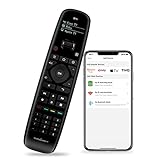
- 【All in One Universal Remote】 Sofabaton U2 universal remote control...
- 【Strong IR Signal Range】 Our upgraded U2 Universal Remote increases...
- 【Programmable Macro】 Super easy to program and customize. Macros are...
The SofaBaton U2 is widely regarded as one of the best infrared remote controls available, especially for users looking to simplify their home entertainment setup without breaking the bank. This universal remote can control up to 15 devices simultaneously, making it an excellent choice for managing TVs, cable boxes, Blu-ray players, gaming consoles, and streaming devices like Fire TV and Apple TV.
One of the standout features of the SofaBaton U2 is its use of a smartphone app for the setup process. The remote pairs with the Sofabaton app via a Bluetooth connection, allowing users to easily add devices by selecting from an extensive database or manually entering device information. This app-based setup provides a more intuitive and flexible programming experience compared to traditional code-entry methods. However, users should be prepared for a bit of a learning curve, especially when customizing buttons or creating macros to automate sequences of commands.
The U2 features a simple OLED screen that displays the device name currently being controlled, and a scroll wheel that lets users quickly switch between devices. While the remote lacks backlit buttons, which can make it challenging to use in a dark room, its ergonomic design and intuitive layout help mitigate this issue.
Although the SofaBaton U2 excels at controlling infrared (IR) and Bluetooth devices, it does not support RF or Wi-Fi gear, which limits its compatibility with some newer smart home devices and streaming gadgets. Nevertheless, it supports essential functions such as master volume control, switching HDMI inputs, and voice control integration with Google Assistant.
The remote runs on two AAA batteries, which are included, and offers a balance between functionality and affordability. Its programmable buttons and macro functions enable users to create custom commands that can control multiple devices with a single press, streamlining the home entertainment experience.
Overall, the SofaBaton U2 is an excellent option for those seeking a versatile, customizable, and budget-friendly universal remote control that covers most devices in a typical home entertainment system. Its reliance on a phone app for setup and programming might deter some users, but the extensive functionality and control it provides make it a worthwhile investment for many.
Replacement Remote Controls for Roku TV

- Compatible with -- Smart TV remote control by Gotellx, it compatible with...
- Please Note -- Gotellx IR remote control only compatible with Roku smart TV...
- No pairing or programming required -- Just pop in 2 AAA batteries and it is...
If you own a Roku TV or streaming device, you might find the original remote limited in functionality or easy to misplace. Replacement remote controls for Roku TVs are designed to offer enhanced features, better ergonomics, and sometimes voice control capabilities. These remotes typically support controlling the TV’s power, volume, and input switching, as well as navigating Roku’s streaming interface.
Some replacement remotes come with voice control features that allow you to search for content, launch apps, or control playback using simple voice commands. Additionally, advanced models may include private listening options via headphone jacks, backlit buttons for use in dark rooms, and quick access buttons for popular streaming services.
When choosing a replacement remote for your Roku TV, consider compatibility with your specific Roku model, the presence of infrared (IR) or radio frequency (RF) technology, and whether you prefer a remote that integrates with smart home assistants like Alexa or Google Assistant. Many Roku replacement remotes use RF technology, which does not require line of sight, offering more flexibility in controlling your devices from different parts of the room.
Moreover, some universal remotes, such as those from SofaBaton, can be programmed to control Roku devices along with other home entertainment equipment, helping you consolidate multiple remotes into a single, easy-to-use device. However, it’s important to note that not all universal remotes support Roku’s RF communication, so verify compatibility before purchasing.
With a suitable replacement or universal remote, you can enhance your Roku TV experience by simplifying control, adding voice commands, and reducing the clutter of multiple remotes in your living space.
Tips for Using Infrared Remote Controls Effectively
Maintain Line of Sight: Since IR remotes rely on line of sight, ensure there are no obstacles between the remote and your devices.
Use Backlit Buttons: For use in a dark room, backlit buttons help you navigate controls without fumbling.
Keep Your Remote Charged: If your remote uses a rechargeable battery, charge it regularly to avoid interruptions.
Leverage Voice Control: Use voice commands to control smart home devices and media playback, making your experience hands-free and more convenient.
Switch HDMI Inputs Quickly: Efficiently switch HDMI inputs to access the right inputs for your devices without multiple remotes.
Conclusion
With a universal infrared remote control in hand, managing your home entertainment system becomes effortlessly seamless. Say goodbye to juggling multiple remotes and hello to streamlined control over your TV, streaming devices, soundbars, and smart home gadgets. Whether you’re switching HDMI inputs, adjusting volume, or launching your favorite apps with voice commands, these remotes bring convenience and simplicity to your fingertips, transforming your viewing experience into pure enjoyment.
FAQ
What is the best infrared remote control for multiple devices?
The best infrared remote control for managing multiple devices is one that supports controlling a wide range of home entertainment equipment, such as the SofaBaton U2. It can control up to 15 devices simultaneously, including TVs, cable boxes, Blu-ray players, gaming consoles, and streaming devices like Fire TV and Apple TV. Look for remotes with Bluetooth and IR blaster capabilities for broader compatibility.
How difficult is the setup process for universal infrared remotes?
Setup difficulty varies by model. Many modern universal remotes use a smartphone app, such as the Sofabaton app, to simplify programming. While this can make initial setup more user-friendly, some users may experience a learning curve, especially when customizing buttons or creating macros. Having your Wi-Fi password handy is essential if the remote supports Wi-Fi features. Patience and following the manufacturer’s instructions carefully will lead to a smoother setup experience.
Can infrared remotes control smart home devices?
Yes, many of the best infrared remote controls now support integration with smart home devices, especially when combined with Bluetooth or Wi-Fi connectivity. This allows you to control smart lights, thermostats, and other compatible devices using the same remote that manages your home entertainment system. Voice control integration with assistants like Google Assistant or Alexa further enhances this functionality.
Why do infrared remotes require a line of sight?
Infrared remotes use light signals that travel in straight lines and cannot pass through solid objects like walls or furniture. This means the remote must be pointed directly at the device or use reflective surfaces to bounce the signals effectively. This line-of-sight requirement is a limitation compared to radio frequency (RF) or Bluetooth remotes but helps reduce interference from other wireless devices.
How do macro functions improve the remote control experience?
Macro functions allow you to program a single button to perform multiple actions in sequence, such as turning on your TV, switching to the correct HDMI input, and powering up your soundbar all at once. This streamlines your home entertainment experience by reducing the number of button presses needed to start watching TV or a movie.