What is a DSP Audio Interface?
A DSP audio interface is a specialized device that not only serves as the bridge between your instruments, microphones, and computer but also includes a built-in DSP processor. This processor allows for real-time effects processing, such as compression, EQ, reverb, and amp sims, directly on the interface without taxing your computer’s CPU. This functionality is especially beneficial for users who want to record with minimal latency while monitoring through high-quality headphone mixes and speakers.
One of the main advantages of a DSP interface is that it is capable of maintaining consistent recording quality and dynamic range, even in demanding professional settings. The versatility of DSP audio interfaces allows them to support a wide range of workflows and environments, from home studios to professional production setups. By offloading plugin processing to the interface’s DSP, the system ensures that your computer runs smoothly, even when using multiple plugins simultaneously. This results in a more efficient workflow and higher performance, which is essential for content creation, streaming, and professional studio environments.
Additionally, DSP audio interfaces often come equipped with dedicated hardware controls and software integration that streamline the recording process. This combination enables users to customize signal routing, manage multiple headphone mixes, and apply complex DSP effects chains with ease. The integration of DSP technology also means that audio professionals can achieve near-zero latency monitoring, which is critical for capturing performances that require precise timing and feel.
DSP Audio Interface Benefits
DSP audio interfaces integrate a dedicated DSP processor to offload intensive audio processing tasks from the host computer, leading to smoother operation and fewer performance bottlenecks.
They allow real-time application of effects such as compression, EQ, reverb, and amp sims with minimal latency, enhancing creativity and precision during recording.
Musicians and producers can monitor their performances with desired effects applied, beneficial for live streaming and content creation by delivering polished audio without extensive post-production.
Advanced routing options and customizable headphone mixes enable multiple performers or engineers to have personalized monitoring setups, improving collaboration and comfort.
Many DSP interfaces come bundled with software suites of high-quality plugins and intuitive control panels, simplifying DSP effects management and routing customization.
The compact size of many modern DSP audio interfaces makes them highly portable without sacrificing professional recording quality.
Despite their small footprint, these devices provide excellent sound quality and dynamic range suitable for professional studios.
Overall, DSP audio interfaces combine powerful onboard processing, low latency, versatile connectivity, and user-friendly software to elevate recording quality and workflow.
Key Features in DSP Audio Interface
Superior Preamps and Input Gain Control
high-quality mic preamps are fundamental to capturing clear and detailed audio. Look for interfaces that offer a single mic preamp or multiple preamps with JFET inputs, which emulate the warmth and character of classic analog circuits. Precise input gain control is also vital to avoid distortion and maintain the integrity of your recordings. The Focusrite Scarlett 2i2, for instance, offers high-quality preamps and is very popular among home producers for its reliable performance.
Balanced Line Outputs and Connectivity
Balanced line outputs help reduce noise and interference, delivering clean signals to your speakers or external gear. The best audio interface will provide multiple outputs and inputs, including Hi-Z inputs for instruments like electric guitars and basses. Additionally, connectivity options such as USB, MIDI, and compatibility with modern computers ensure seamless integration into your existing setup. USB-C connectivity is becoming the standard for modern audio interfaces, offering improved speed and compatibility. Using the correct cable types, such as USB cables for computer connections or 1/4-inch cables for speakers and instruments, is essential for optimal connection and performance.
Low Latency and DSP Effects
Minimal latency is a critical feature for any recording setup, allowing musicians to perform and monitor in real-time without noticeable delay. Latency is the time it takes for an audio signal to be converted from analog to digital, processed, and then converted back to analog for playback. A DSP audio interface equipped with powerful DSP effects enables you to apply compression, EQ, reverb, dynamics, and amp sims directly on the device, enhancing your sound during both tracking and mixing stages.
Software Integration and Routing Capabilities
The included software can significantly impact your workflow. For example, RME’s TotalMix software offers extensive routing and mixing options, making it easier to manage multiple headphone mixes and speaker outputs. Such software enhances the device’s functionality, offering greater control over your audio channels and DSP effects.
Top DSP Audio Interfaces
Fireface 802 USB/Firewire Audio Interface

- 30-in/30-out Hybrid USB/FireWire Audio Interface with 12 x 12 Analog I/O
- DSP-driven Onboard Mixing with Effects
- ADAT/SMUX AES/EBU Digital I/O
The Fireface 802 is a versatile and powerful DSP audio interface that has been a staple in many professional and home studios. It features a robust combination of USB and Firewire connectivity, allowing it to integrate seamlessly with a wide range of computer systems. Its dual connectivity options provide flexibility for users who may work across different platforms or require reliable redundancy during sessions.
Equipped with high-quality mic preamps and converters, the Fireface 802 delivers exceptional recording quality and a broad dynamic range. The interface supports multiple simultaneous inputs and outputs, making it suitable for complex recording setups involving numerous microphones and instruments. Its balanced line outputs reduce noise and interference, ensuring clean signal transmission to monitors or external processors.
One of the key strengths of the Fireface 802 is its integration with RME’s TotalMix FX software. This powerful DSP mixer enables users to create multiple independent headphone mixes, apply real-time DSP effects like EQ, compression, and reverb, and manage complex routing scenarios with ease. The TotalMix FX software is renowned for its low latency performance and intuitive interface, empowering users to tailor their monitoring experience precisely to their needs.
The Fireface 802’s build quality and reliability make it a dependable choice for both studio and live environments. Its compact size and rugged construction allow for easy transport and durability during tours or mobile recording sessions. Additionally, the interface provides MIDI I/O for connecting external controllers or instruments, enhancing its versatility.
Universal Audio Apollo Twin X DUO Gen 2 Studio + Edition Thunderbolt 3 Audio Interface

- Experience analog tones with Unison preamps, letting you record in realtime...
- Access the full library of 200+ UAD DSP and Native plug-ins, including...
- Mix with confidence in any room or through headphones using Apollo Monitor...

The Universal Audio Apollo Twin X DUO Gen 2 is a flagship model in the Universal Audio Apollo series, designed to provide exceptional recording quality and professional-grade features in a compact form factor. It boasts a powerful onboard DSP processor that enables real-time processing of Universal Audio’s acclaimed plugins, including amp sims, compressors, EQs, and reverbs, all with minimal latency. This makes it an ideal choice for musicians and producers who demand top-tier sound and performance without sacrificing portability.
Equipped with premium mic preamps and JFET inputs, the Apollo Twin X DUO offers warm, analog-style tonal characteristics that enhance the natural sound of vocals and instruments. Its high dynamic range converters ensure pristine audio capture, preserving every nuance of your performance. The interface features balanced line outputs and multiple input options, including Hi-Z inputs for guitar and bass, providing versatile connectivity for various recording scenarios.
The Thunderbolt 3 connectivity guarantees ultra-fast data transfer speeds and low latency, ensuring smooth integration with modern computers and DAWs. Additionally, the Apollo Twin X DUO supports multiple headphone mixes, allowing performers and engineers to customize monitoring setups for optimal workflow and comfort during sessions.
The Studio + Edition bundles the interface with an extensive collection of Universal Audio plugins, giving users access to some of the best DSP effects and processing tools available on the market. This package is perfect for home studios and professional environments alike, offering a comprehensive solution for recording, mixing, and content creation.
Fireface UCX II 40-channel USB Interface
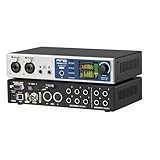
- 20-in/20-out USB 2.0 Audio Interface - macOS/Windows/iOS
The RME Fireface UCX II is a highly regarded DSP audio interface known for its robust performance and extensive feature set. It offers up to 40 channels of simultaneous input and output, making it suitable for complex recording setups and multitrack sessions. The unit is equipped with high-quality mic preamps and converters that ensure pristine recording quality and a wide dynamic range.
One of the standout features of the UCX II is its integration with RME’s TotalMix software, which provides unparalleled routing flexibility and allows users to create multiple independent headphone mixes with ease. This software also includes built-in DSP effects such as EQ, compression, and reverb, enabling users to shape their sound directly within the interface without placing additional load on their computer’s CPU.
The interface supports USB connectivity, ensuring compatibility with modern computers, and includes MIDI I/O for connecting external controllers or instruments. Its compact size and durable build make it an excellent choice for both home studios and professional environments. Additionally, the UCX II’s low latency performance and reliable driver support contribute to a smooth and responsive recording experience, making it a perfect choice for musicians and producers who demand high-quality sound and versatile functionality from their DSP audio interface.
MOTU UltraLite-mk5
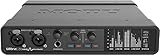
- 18 x 22 USB audio interface — 2 combo XLR/TRS mic/line/hi-Z guitar...
- Superb analog quality with ultra-low latency — Analog outputs deliver...
- DSP-driven monitor mixing — Mix live inputs to any analog output pair...
The MOTU UltraLite-mk5 is a standout choice for those seeking a compact yet powerful DSP audio interface that excels in both studio and live environments. Known for its exceptional sound quality and robust build, the UltraLite-mk5 offers a versatile set of features that cater to musicians, producers, and content creators alike.
One of the key highlights of the UltraLite-mk5 is its impressive 40 simultaneous inputs and outputs, which provide extensive connectivity options for a variety of recording scenarios. This includes multiple balanced line outputs, mic preamps, and Hi-Z inputs, ensuring compatibility with a wide range of instruments and microphones. Its high dynamic range converters deliver crystal-clear audio with minimal noise, preserving the integrity of your recordings.
The interface is equipped with a dedicated DSP processor that allows for real-time effects processing, including EQ, compression, reverb, and other DSP effects, without burdening your computer’s CPU. This capability is particularly beneficial for users working with complex sessions or those who require minimal latency during tracking and monitoring.
MOTU’s CueMix 5 software complements the hardware by providing an intuitive control panel for routing, mixing, and managing headphone mixes. This software enables users to create multiple personalized headphone mixes, which is essential for collaborative recording sessions or live performances where performers need customized monitoring setups.
Furthermore, the UltraLite-mk5 supports USB connectivity, ensuring compatibility with modern computers, including both Windows and macOS systems. Its small size and durable construction make it an ideal choice for mobile recording setups or home studios with limited space, without compromising on professional recording quality. MOTU UltraLite-mk5 combines small size, power, and versatility, making it a good reason to consider this interface as your go-to DSP audio interface for a wide range of audio production needs.
Troubleshooting Common DSP Audio Interface Issues
Even the best DSP audio interface can encounter occasional hiccups that impact your recording quality, workflow, or overall sound. Knowing how to troubleshoot these common issues ensures your audio interface continues to deliver the dynamic range, minimal latency, and pristine sound quality you expect—whether you’re in a home studio or a professional environment.
Latency Problems: If you notice a delay between your input and output, start by checking your interface’s buffer size and sample rate settings. Lower buffer sizes reduce latency but may strain your computer, while higher settings can introduce noticeable lag. Adjust these parameters in your audio interface’s control panel or your DAW until you find the right balance for your system. Many dsp audio interfaces, like the Universal Audio Apollo, offer built-in latency compensation to help maintain real-time monitoring and recording.
Input Gain Issues: Achieving the right input gain is essential for clean, distortion-free recordings. If your audio sounds too quiet or is clipping, adjust the gain controls on your mic preamps or instrument inputs. Some interfaces provide visual feedback or automatic gain features to help you set optimal levels. Always monitor your input meters to ensure you’re capturing the full dynamic range without unwanted noise.
Headphone Mix Challenges: Custom headphone mixes are vital for performers and producers. If you’re struggling with your headphone output, review your routing settings in the interface’s software mixer. Devices like the RME UCX II, with advanced routing and multiple headphone outputs, allow you to create personalized mixes for each user. Double-check that your outputs are assigned correctly and that levels are balanced for comfortable monitoring.
Mic Preamp Concerns: If you experience low signal or excessive noise from your mic preamps, try adjusting the preamp gain or switching to a different input. Some audio interfaces offer high-headroom preamps or the option to use external preamps for added flexibility. Make sure your cables and connections are secure, and consider using balanced line outputs to minimize interference.
DSP Effects Troubles: When DSP effects like reverb, compression, or amp sims aren’t working as expected, verify your plugin settings and ensure your interface’s DSP processor isn’t overloaded. Some interfaces provide detailed control panels for managing DSP effects—explore presets and parameters to optimize your sound. If you encounter persistent issues, restarting your interface or updating its firmware can often resolve software glitches.
Connectivity and Compatibility: Dropped signals or connection problems can disrupt your workflow. Inspect all cables (USB, MIDI, balanced line outputs) for damage and ensure they’re firmly connected. If your interface isn’t recognized by your computer, check for the latest drivers and firmware updates from the manufacturer’s website. Compatibility with your operating system and DAW is crucial—refer to official compatibility charts to confirm your setup is supported..
Conclusion
Incorporating a DSP audio interface into your setup unlocks a new level of creative freedom and precision, delivering crystal-clear sound, ultra-low latency, and powerful real-time effects processing. Whether crafting music, streaming live, or producing content, these compact yet mighty devices streamline your workflow and elevate your recordings, making every session smoother and more inspiring.
FAQ
How does DSP improve recording quality?
By offloading effects processing to the interface’s onboard DSP processor, the computer’s CPU is freed up, reducing the risk of glitches and dropouts during recording. This ensures consistent dynamic range and sound quality, allowing for professional-grade recordings even on less powerful systems.
Can DSP audio interfaces reduce latency?
Yes, one of the key benefits of DSP audio interfaces is their ability to provide near-zero latency monitoring. This means musicians can hear themselves in real-time with effects applied, which is crucial for accurate performances and better workflow during tracking.
Are DSP audio interfaces compatible with all DAWs and computers?
Most modern DSP audio interfaces are designed to be compatible with a wide range of DAWs and operating systems, including Windows, macOS, and some Linux distributions. However, it’s always advisable to check the manufacturer’s compatibility list to ensure seamless integration with your specific setup.
What should I look for when choosing the best DSP audio interface?
When selecting a DSP audio interface, consider factors such as the number and type of inputs and outputs, quality of mic preamps and converters, available DSP effects, latency performance, software integration, and connectivity options like USB-C or Thunderbolt. Budget and intended use (home studio, professional studio, streaming) also play significant roles.
Can I use DSP audio interfaces for live streaming and content creation?
Absolutely. DSP audio interfaces are ideal for content creators and streamers as they allow for real-time processing of vocals and instruments, enhancing the overall sound quality without taxing the host computer. Features like loopback and multiple headphone mixes further facilitate smooth streaming workflows.