Top CD Players Under $100
Syitren R300

- Multi-functional CD Player: This R300 CD Player is a perfect gifts for...
- Bluetooth CD Player: No built-in audio,It can be connected with...
- No built-in audio: It can reduce the impact of audio vibration on the CD...
The Syitren R300 is worth investigating first if you want a compact player for both headphone listening and connection to an existing sound system. Its rechargeable design makes it a more convenient everyday option than a basic player that depends on disposable batteries.
Best suited to: Listeners who already own headphones or powered speakers and want one compact player for several listening locations. It makes more sense as a source component than as a self-contained room system.
Key features and benefits: The R300 combines CD playback, rechargeable battery operation, Bluetooth connectivity, and wired listening connections. Its appeal is the ability to move between personal listening and a stationary setup without buying a full-width stereo component.
For wireless listening, confirm that the exact version offered supports Bluetooth transmission to headphones or speakers. A listing that simply says “Bluetooth” is not enough. Likewise, check the manual before treating a wired socket as a dedicated line output rather than a volume-controlled headphone connection.
Main advantage: The R300 offers a useful middle ground between a stripped-down personal player and more expensive specialist equipment. Rechargeable operation is especially attractive if you listen regularly rather than occasionally.
Main drawback: Its eligibility for this particular budget needs checking. Descriptions such as “entry-level” or “around the budget limit” do not establish that a new unit qualifies. Do not choose it merely because it looks more substantial than a conventional portable.
Setup requirements and accessories: Plan on supplying headphones, powered speakers, or an amplifier-based system. Confirm the charging cable, wall-adapter inclusion, analog cable requirements, warranty coverage, and supported disc formats. Do not assume that a charging connection also carries USB audio.
Verdict: The strongest overall candidate for an adaptable listening setup, provided its current delivered cost qualifies and its exact outputs match your equipment.
Klim Nomad

- ✅ ENJOY THE AUDIO ASSURANCE YOU DESERVE. The KLIM Nomad has been...
- ✅ ANTI-SKIP / ANTI-SHOCK PROTECTION: Who wants skips and interruptions...
- ✅ HOURS AND HOURS OF PLAYBACK. Forget about buying batteries every few...
The Klim Nomad is the more natural candidate if your priority is carrying CDs rather than displaying a player beside a stereo. Its slim personal-player format and latching lid address practical travel concerns: keeping the disc enclosed and avoiding an unnecessarily bulky package.
Best suited to: People who primarily use headphones while traveling, commuting, or moving between rooms. It is also worth considering if you want a rechargeable portable CD player without building a separate speaker system.
Key features and benefits: The Nomad is associated with rechargeable operation, a wired headphone connection, Bluetooth functionality, and advertised anti-skip protection. Check the exact model’s manual for supported audio CDs, burned discs, MP3 CDs, and wireless output behavior.
The lid latch is a useful feature, but it does not make the player impact-resistant. A carrying pouch or separate compartment remains sensible because pressure on the lid and exposed controls can create problems inside a crowded bag.
Main advantage: Its design puts everyday portability ahead of extra home-audio features. Wired headphones provide the simplest listening path, avoiding pairing problems and reducing dependence on another rechargeable device.
Main drawback: Advertised anti-skip protection is not evidence of uninterrupted playback during jogging or rough travel. No independently established movement test or battery-runtime measurement is presented here. Treat wireless compatibility as model-specific rather than universal.
This is a personal listening candidate, not a speaker-equipped boombox. Do not assume that it includes built-in speakers simply because some compact players do.
Setup requirements and accessories: Verify the charging lead, power-adapter requirements, included earphones, and any supplied AUX cable. For carrying, check whether the controls have a hold function and whether playback resumes where you stopped.
Verdict: A sensible portable-first candidate when secure disc loading, rechargeable operation, and headphone listening matter more than room-filling playback.
GPX PC332B
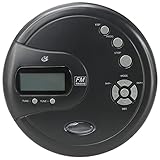
- PORTABLE CD PLAYER: Enjoy your favorite CDs at home or on the go with a...
- DIGITAL FM RADIO: Built-in digital FM radio lets you tune in to your...
- ANTI-SKIP PROTECTION: 60-second anti-skip protection helps maintain smooth...

The GPX PC332B is an inexpensive personal CD player with FM radio. Its attraction is straightforward: it covers conventional wired listening without making Bluetooth pairing, app control, or a built-in rechargeable battery part of the experience.
Best suited to: Occasional listeners, students, and anyone who wants a basic replacement for an older personal player. It is particularly relevant when you already own ordinary wired headphones and mostly play commercially pressed audio CDs.
Key features and benefits: Published specifications identify CD playback, CD-R/CD-RW compatibility, FM radio, a 3.5 mm headphone connection, and anti-skip protection. Battery operation uses two AA batteries. It is not a built-in rechargeable player, and USB charging should not be assumed.
MP3 CD compatibility is another important distinction. Support for CD-R and CD-RW describes disc types; it does not establish support for MP3 files burned onto those discs. Choose this model for conventional audio-CD use unless the exact documentation confirms otherwise.
Main advantage: Replaceable batteries provide a simple power arrangement. You can carry spares instead of waiting for an internal battery to recharge, and the absence of wireless features keeps the connection process straightforward.
Main drawback: Basic does not necessarily mean cheapest over time. Frequent listening can add recurring battery costs, while an external power adapter may require a separate purchase. Its headphone output also should not be mistaken for a fixed-level stereo line output.
Setup requirements and accessories: Product documentation identifies stereo earphones, while batteries and the optional external power adapter require checking against the seller’s package description. Any replacement adapter must match the specified voltage, polarity, and connector; a physically fitting plug is not sufficient.
Verdict: A practical candidate for simple wired playback, provided you accept replaceable batteries, limited connectivity, and no assumed MP3-disc support.
Naxa NPB-251BK

- A back-to-basics boombox that can play CDs and receive AM/FM radio...
- Plays CD and CD-R/RW discs
- AM/FM radio
The Naxa NPB-251BK is another compact boombox candidate for listeners who prefer an integrated system. Its role is different from the rechargeable personal players above: convenience comes from having the disc mechanism, controls, radio, and speakers in one portable enclosure.
Best suited to: Casual room listening, spoken-word CDs, and buyers who do not want headphones to be essential equipment. It also makes sense when the player will mostly sit near an outlet but occasionally move elsewhere.
Key features and benefits: The NPB-251BK combines a top-loading CD player, AM/FM radio, built-in speakers, and an auxiliary input. AC and battery operation provide different ways to use it around the home.
The AUX input is particularly useful if you want its speakers to reproduce sound from another compatible device. However, it does not establish that the boombox can send CD audio to an external stereo. Inputs and outputs serve opposite purposes.
Before buying, verify supported CD formats and battery requirements in the exact manual. Do not infer MP3 playback, Bluetooth, or rechargeable operation from features offered on other Naxa models with similar names.
Main advantage: It offers a straightforward route to independent playback. For someone starting without speakers or an amplifier, an integrated boombox can be more practical than a seemingly inexpensive personal player that needs additional equipment.
Main drawback: Connection flexibility may be limited. If private listening or stereo integration is important, require explicit confirmation of the necessary output. An auxiliary input alone does not meet either need.
Setup requirements and accessories: Check the supplied AC power connection, battery size and quantity, and any required audio cable. Battery-powered does not mean rechargeable, and ordinary disposable cells must never be charged inside equipment not designed for that purpose.
Verdict: A sensible alternative for basic, self-contained listening, but a less suitable choice when wireless headphones or external-system outputs are essential.
Choosing a CD Player for Your Setup
Built-In Speakers Versus Headphone Listening
A personal CD player normally needs headphones or another playback system. A boombox with built-in speakers works independently, although you may still need batteries or access to an outlet.
For a small home setup, powered speakers are the simplest external-speaker option because they contain amplification. Passive speakers need a separate amplifier or receiver.
Think of the connection in this order:
CD player → supported connection → headphones, powered speakers, stereo, or car
That sequence also reveals hidden costs. A player can fit the purchase budget yet exceed your total allowance once you add speakers, cables, batteries, or a power adapter. Price the complete listening setup, not just the disc mechanism.
Bluetooth Transmission Versus Reception
A CD player for Bluetooth headphones needs a Bluetooth transmitter. This sends the player’s audio outward to a compatible receiving device.
A Bluetooth receiver does the reverse: it accepts audio from a phone or another source. A speaker-equipped player may include reception without being able to transmit CD audio.
Look for explicit wording such as “Bluetooth output” or “transmits to headphones.” A Bluetooth version number alone does not identify the direction.
Pairing can still be awkward without a screen. Nearby paired devices may reconnect automatically, so temporarily disconnect them during setup. Do not assume compatibility with every headset, hearing device, speaker, or car stereo.
Audio Outputs for a Home Stereo
A headphone output is amplified and volume-controlled. It can often feed an analog input on powered speakers or a stereo, but the volume needs sensible adjustment to avoid a weak signal or distortion.
A dedicated analog line output is intended for connection to another audio component. Optical or coaxial S/PDIF carries digital audio and requires a compatible digital input.
A CD player contains a digital-to-analog converter, or DAC, for its analog outputs. A CD transport instead supplies digital audio to an external DAC or digital-input system.
None of these ordinary source connections directly powers passive speakers. Avoid connecting to a phono input, which is designed for a different signal.
Battery Power and Rechargeable Operation
Replaceable batteries suit occasional listening and situations where carrying spares is easier than finding an outlet. Built-in rechargeable batteries are more convenient for frequent use, but runtime and long-term battery replacement deserve attention.
AC operation suits stationary listening. USB power can be convenient, provided the required power supply and cable are compatible.
Crucially, USB power does not necessarily mean USB audio playback. A port may only charge the battery or power the mechanism. Other ports accept music files from a flash drive but cannot send CD audio to a computer or car.
Check the port’s stated function rather than relying on its shape.
Disc Compatibility and Gapless Playback
Commercial audio CDs, home-recorded audio CDs, and MP3 CDs are not interchangeable compatibility claims.
CD-R and CD-RW describe recordable media. MP3 support means the player can decode compressed files stored on a compatible data disc. A player may support burned audio CDs without supporting MP3 CDs.
Finalizing a home-recorded disc may also be necessary. Poor burns, damaged surfaces, and unusual recording methods can cause reading problems even where the format is supported.
Gapless playback matters for live albums and continuous recordings. A pause between tracks can interrupt the performance. Neither standard CD support nor MP3 compatibility proves gapless operation; confirm it for the exact format you use.
Anti-Skip Protection for Listening on the Move
An anti-skip buffer reads audio ahead and temporarily stores it. If vibration interrupts reading briefly, buffered music can continue while the mechanism recovers.
That protection has limits. Sustained shaking can empty the buffer, while scratches or recording errors may prevent reliable reading in the first place.
Advertised buffer duration is not a guarantee of performance during jogging, rough roads, or repeated impacts. A secure lid and stable carrying position matter alongside buffering.
For travel, keep the player protected from pressure and avoid placing it where every step causes it to bounce. For stationary use, a stable surface often matters more than an impressive anti-skip claim.
Using a Portable CD Player in a Car
A portable CD player for a car with AUX is usually easiest to connect through a wired analog connection:
1. Check for a 3.5 mm AUX input. Make sure it is an audio input, not a microphone connection.
2. Confirm the player’s output. A headphone socket commonly requires a 3.5 mm stereo cable; start with moderate volume.
3. Verify Bluetooth compatibility. Both devices need compatible audio roles, and some cars expect phone-specific pairing behavior.
4. Check adapters before purchase. A cassette adapter, FM transmitter, or separate Bluetooth accessory introduces additional cost and potential limitations.
A vehicle’s USB socket may supply power without accepting CD audio. Players designed specifically to present themselves as supported USB audio devices are a separate compatibility case.
Secure the player before driving, keep cables clear of controls, and choose the disc while parked. In-dash replacement head units fall outside this portable-player guide.
DVD Players and Used Components as Budget Alternatives
DVD/CD Players for an Existing Audio System
A DVD player can be a practical CD source when portability and built-in speakers are unnecessary. The supplied product information identifies the Emerson ED-8001 as supporting DVD and CD playback, making it a candidate for further connection checks rather than a verified current-budget recommendation.
The decisive detail is the output arrangement. HDMI can connect to a compatible television or AV receiver. Analog stereo outputs can serve an amplifier or powered speakers. A digital-only connection requires a suitable digital input or external DAC.
When choosing the best CD DVD player for home use, check whether basic audio-CD playback works without a television. Some settings and file-navigation screens may require one.
Video upscaling features do not establish better CD playback, and USB recording features should not outweigh straightforward compatibility with your existing system.
Used CD Players Under $100
Used equipment can provide conventional stereo connections and full-size controls without the cost of a new hi-fi component. However, a familiar brand does not establish the condition of an individual machine.
For a used Sony CD player or another established brand, check:
- Reliable loading, ejecting, and repeated tray operation.
- Reading at the beginning and end of several discs.
- Track skipping, searching, and display operation.
- Both analog output channels and any digital output.
- Remote availability and access to essential functions.
- Return terms, packing quality, and shipping damage coverage.
Multi-disc changers add mechanical complexity. A machine that reads one disc may still have carousel or disc-selection problems.
Keep used bargains separate from new-player comparisons. Condition, shipping, and return protection can matter more than the advertised asking price.
FAQ
What makes an affordable CD player good quality?
A good affordable CD player reads your discs reliably, provides the outputs your setup needs, and has understandable controls. Suitable power options, a secure lid, clear documentation, and a useful return policy matter more than decorative features. Confirm supported formats and necessary accessories before deciding that a low purchase cost represents good value.
Are CD players being phased out?
CD drives are absent from many newer computers and vehicles, but standalone CD players remain available. Personal players, boomboxes, stereo components, and compatible DVD players still provide ways to play discs. Reduced inclusion in other devices does not mean existing collections are unusable or that every category of CD equipment has disappeared.
What should a cheap CD transport include?
A CD transport needs a compatible digital audio output, typically optical or coaxial S/PDIF, plus dependable disc reading. Your external DAC, amplifier, or receiver must accept that connection. A headphone-only player is not a conventional digital transport, and the cheapest purchase may become less economical once additional conversion equipment is required.
Can an affordable CD player connect to Bluetooth headphones?
Yes, if it includes Bluetooth transmission compatible with your headphones. Bluetooth reception alone cannot send CD audio outward. Check the exact model’s output function and pairing instructions before buying. A separate transmitter can sometimes connect to an analog output, but it adds another device to power and another pairing step.
Can I connect a budget CD player to my TV?
Only if the television has an input that accepts the player’s signal. Many television audio sockets are outputs intended for soundbars or headphones, not inputs. A compatible DVD/CD player connected through HDMI may be more practical. A simple cable cannot reverse signal direction or convert analog audio into HDMI by itself.
Conclusion
An affordable CD setup succeeds when every part fits the way you listen: the disc formats, power arrangement, controls, and connection to your headphones or speakers. Prioritize those essentials before wireless extras or styling. Confirm the complete package and return terms, allow for necessary accessories, and choose a format that makes playing your collection straightforward rather than complicated.