A compact studio needs speakers that reveal mix problems without taking over the desk. The best 4 inch studio monitors balance useful midrange detail, sensible connectivity, and enough clean output for close listening—not simply the smallest cabinets or the biggest bass claims.
“4 inch” refers to the nominal low-frequency driver diameter, not the speaker’s width. Cabinet dimensions, listening distance, and room acoustics still determine whether a monitor fits your workspace.
After comparing the shortlist’s features, system costs, and intended uses, the ADAM Audio A4V is our best overall candidate for a primary mixing setup. The Edifier MR4 is the budget alternative. These are researched recommendations, not results from a hands-on group test; prices are budgeting estimates rather than live quotations.
Top 4 Inch Studio Monitor Picks
ADAM Audio A4V – Best Overall

- Powered Studio Monitor with 4" LF Driver
- Rotatable X-ART HF Driver
- DSP-based Tuning (each)
Verdict: The A4V is the strongest all-round candidate for producers seeking a compact primary mixing monitor with substantial adjustment options.
Its key specifications include a nominal 4-inch Multi-Layer Mineral woofer, an X-ART tweeter, balanced XLR connectivity, and onboard digital signal processing. The cabinet is narrow, although its depth and height still need checking against your desk.
The main justification for its premium is control. Rear-panel room-adaptation settings provide a starting point, while A Control software offers deeper adjustment through an Ethernet connection. Supported Sonarworks correction profiles can be stored in the monitors, subject to the required software and measurement workflow.
That is more flexible than the simple bass and treble knobs on entry-level desktop speakers. It also means correction need not depend on leaving a monitoring plug-in active during every session.
The limitations are cost and complexity. Two speakers, balanced cables, suitable stands, and optional calibration tools create a considerably more expensive system than the MR4. Ethernet is for control, not a USB-style audio connection.
Neither DSP nor the extended published bandwidth makes this a full-range bass monitor. Low-frequency decisions still need appropriate cross-checks.
Buy if: You want a long-term compact mixing system with detailed setup controls.
Avoid if: Your priority is a complete, inexpensive desktop pair with a convenient front volume knob.
Edifier MR4 — Best Budget Candidate

- TRUE STUDIO MONITOR - Based on the highly rated Edifier bookshelf speakers...
- STUDIO QUALITY SOUND - The 1" silk dome tweeter and 4" composite woofer...
- FLEXIBLE CONNECTORS - 1/4" balanced TRS input, an unbalanced RCA input, an...
Verdict: The MR4 is a practical first step beyond ordinary computer speakers, particularly when the entire stereo system must fit a restricted budget.
The pair combines 4-inch composite woofers, 1-inch silk-dome tweeters, balanced TRS inputs, RCA connections, and a front auxiliary input. One cabinet contains the main electronics and connects to the companion speaker using speaker wire.
That configuration keeps purchase and setup costs low. A front volume control and headphone connection are useful when the speakers serve both production and everyday listening. Rear bass and treble controls provide broad tonal adjustment.
Its strongest purchase case is accessibility: a beginner can connect an audio interface without immediately buying two individually powered monitors. That does not establish professional-reference performance, however. Edifier’s claims about monitoring accuracy should not be treated as independent findings.
The published 60 Hz lower limit has no stated tolerance, so it cannot be compared directly with Neumann’s ±3 dB figure. Deep synth bass, kick fundamentals, and sub-bass effects remain areas for headphone checking.
The standard MR4 does not include Bluetooth, USB audio, or microphone-based room calibration.
Buy if: You need affordable powered desktop monitoring for learning production and making basic balance decisions.
Avoid if: You require calibrated low-frequency monitoring or substantial clean output at longer distances.
PreSonus Eris Studio 4 — Best Value Candidate

- HONEST. Eris 4.5 near field studio monitors deliver studio-quality...
- EXPRESSIVE. Clear, accurate audio with a big low end — Eris 4.5’s...
- POWERFUL. Compact speakers that pack a punch — 50 Watts of Class AB dual...

Verdict: The Eris Studio 4 offers useful mixing-oriented controls without the stereo-system cost of premium compact monitors.
This is specifically the Eris Studio 4, not the Eris 3.5, Eris 4.5BT, or an older similarly named Eris model. It uses a nominal 4-inch woven-composite woofer, a 1-inch silk-dome tweeter, and separate amplification for the drivers. Each cabinet is independently powered.
Balanced XLR and TRS inputs make connection to an audio interface straightforward. RCA accommodates consumer sources. Its front port can simplify physical placement, although it does not prevent bass reinforcement near walls.
The practical upgrade over basic multimedia speakers is adjustment flexibility. Acoustic-space settings, midrange and high-frequency controls, and a selectable low-frequency cutoff help accommodate placement and subwoofer integration. These controls are more task-specific than a generic “bass boost.”
The manufacturer’s EBM waveguide is intended to control dispersion and widen the usable listening area. Without a level-matched comparison, it would be inappropriate to claim that it produces better imaging than every competing monitor.
Remember that the advertised price commonly covers one speaker. Also, the published 55 Hz lower limit lacks a clearly stated tolerance in the headline specification.
Buy if: You want independently powered monitors, professional connections, and useful acoustic controls at a moderate pair cost.
Avoid if: You need automatic measurement-based calibration or an all-in-one multimedia feature set.
Neumann KH80 DSP — Best Room-Calibration Candidate
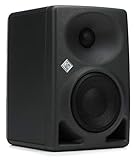
- Mathematically Modeled Dispersion Waveguide (each) - Gray
- Active 4" Nearfield Studio Monitors with DSP Control
Verdict: The KH80 DSP is the most compelling candidate here for buyers planning a measurement-led monitoring system.
It combines a nominal 4-inch woofer, controlled-directivity waveguide, balanced XLR/TRS combination input, and internal DSP. Its published 59 Hz–20 kHz response at ±3 dB is more informative than an unqualified frequency-range claim.
For automatic alignment, budget for the Neumann MA 1 measurement microphone and use the compatible MA 1 software workflow. A suitable audio interface with microphone input and phantom power, plus the necessary network connections, is also required. The microphone is generally a separate purchase unless explicitly included in a bundle.
Expect roughly another $250–$300 for an MA 1 microphone as a planning allowance; software requirements and bundle pricing should be checked before ordering.
Calibration can improve frequency balance and speaker matching at the listening position. It can also address supported level and timing adjustments. It cannot eliminate long room decay, strong desk reflections, or every seat-dependent cancellation.
The compact cabinet is helpful, but this is not a simple computer-speaker package. Audio remains analog through the balanced input; the network connection handles control and alignment.
Buy if: You will invest time and money in placement, measurement, and calibration.
Avoid if: You expect automatic correction to rescue an unsuitable desk or untreated room by itself.
Genelec 8020D — Best Premium Compact Candidate

- 8020 DPM studio monitor active, anthracite.
- Brand: Genelec
Verdict: The 8020D suits a compact professional workspace where robust construction and installation flexibility matter.
Its nominal 4-inch woofer and metal-dome tweeter sit in a rounded die-cast aluminum enclosure. Balanced XLR is the audio connection, and the included Iso-Pod supports modest aiming adjustments while helping reduce mechanical coupling to the supporting surface.
The enclosure and available mounting accessories make it attractive for edit suites, installed workstations, and other spaces where conventional desktop stands are awkward. Confirm the correct bracket and load rating for the intended installation.
Rear switches provide model-specific room-response adjustment, including bass-related compensation. These are useful tools after placement, not an automatic acoustic analysis system.
A crucial distinction: the Genelec 8020D is not GLM-compatible. Do not assume that every Genelec monitor supports the company’s networked calibration system. Buyers wanting GLM should investigate an appropriate SAM model separately.
Its limitations are deliberately simple connectivity and premium pair cost. There is no USB input, Bluetooth receiver, or measurement-based correction built into this model. The published −6 dB lower limit also should not be interpreted as flat output to 56 Hz.
Buy if: You want a compact, mountable professional monitor with durable construction and straightforward analog operation.
Avoid if: You specifically want Genelec GLM calibration or direct computer connectivity.
Choosing a 4 Inch Studio Monitor
Mixing Accuracy and Bass Extension
A capable 4-inch monitor can support decisions about vocals, guitars, synth presence, reverb, stereo placement, and overall balance. Those jobs depend on response consistency and your listening environment—not woofer diameter alone.
Bass is the main qualification. You may hear a bass line’s harmonics clearly while missing its lowest fundamental. Compensating by boosting bass can then produce an overloaded mix on larger systems.
Compare measurement tolerances, not just frequency numbers. A 55 Hz endpoint with no tolerance is less informative than a specified ±3 dB response. A −6 dB endpoint describes substantially reduced output.
Use familiar reference tracks and trustworthy headphones to check low-frequency content. Headphones provide another perspective, not proof that the speakers or room are accurate.
Output and Listening Distance
Clean output depends on driver excursion, amplification, limiting, frequency content, and distance. Amplifier wattage alone does not reliably rank monitor loudness.
Close listening helps compact speakers deliver useful levels without demanding excessive output. Moving farther away reduces the direct sound level and often increases the room’s contribution.
Allow headroom for musical peaks rather than operating continuously near the speaker’s limits. Bass-heavy material is particularly demanding for small drivers.
Do not choose a woofer size solely from room dimensions. A 4-inch monitor may suit a short-distance workstation in a large room, while a small room may require more output than a particular compact model can provide.
Inputs and Audio-Interface Compatibility
For an interface with balanced outputs, choose balanced TRS-to-TRS, TRS-to-XLR, or XLR-to-XLR cables as appropriate. Balanced connections help reject interference; they do not make an inaccurate speaker accurate.
When comparing the best 1/4 inch cables for studio monitors, prioritize correct TRS wiring, secure connectors, sensible length, and reliable construction. Expensive “audiophile” cables are unnecessary.
RCA and 3.5 mm auxiliary inputs work with consumer equipment, although unbalanced connections can be more susceptible to noise. A headphone-output adapter does not turn an unbalanced source into a balanced one.
Bluetooth is convenient for playback. Wired audio remains preferable for low-latency recording, software instruments, and precise editing.
Stereo-Pair Cost
Check whether the advertised price covers one cabinet or two. The A4V, Eris Studio 4, KH80 DSP, 8020D, and Shape 40 normally require buying two individually sold speakers.
Add approximately $20–$60 for a basic cable pair and $40–$150 for suitable desktop stands as 2026 planning allowances. Taller stands and specialized mounting hardware can cost more.
Calibration adds another layer: the KH80 workflow needs appropriate measurement hardware, while supported A4V correction requires the relevant software and measurement setup.
The MR4 and GoAux 4 are easier to budget because they are sold as stereo systems. Compare complete usable setups, not a single premium cabinet against an entire budget pair.
Setting Up 4 Inch Monitors on a Desk
Listening Triangle and Tweeter Height
Start with a symmetrical equilateral-triangle placement, then refine it for the monitor and workstation:
1. Position both speakers at equal distances from your ears.
2. Make speaker spacing approximately equal to each speaker-to-listener distance.
3. Raise the tweeters toward seated ear height using suitable stands.
4. Aim the speakers according to the manufacturer’s guidance.
5. Check a mono reference track for a stable central image.
Measure from comparable points on each cabinet. Keep the listening position centered rather than compensating for uneven distances with casual volume adjustments.
Follow model-specific orientation instructions. Do not place a vertical two-way monitor sideways merely because it fits under a screen; orientation changes can affect dispersion and imaging.
Wall Clearance and Desk Reflections
Walls reinforce some low frequencies, while reflected sound can also create cancellations. A front port or passive radiator does not remove these boundary effects.
Consult manufacturer clearance guidance and leave ports or radiators unobstructed. Avoid pressing the Shape 40’s side radiators against nearby objects.
Large desktops produce early reflections that can alter midrange response. Raising speakers and reducing the reflective surface between them and your ears may help. Moving the listening position or speakers slightly can also change troublesome bass interactions.
Adjust placement before applying EQ. Deep cancellation is usually a poor target for aggressive boosting because extra output may not restore the missing sound at your seat.
Stands establish height and angle. Isolation products can reduce mechanical vibration transmitted into the desk, but isolation pads do not solve room modes. Acoustic treatment, placement, and measured adjustment address different problems and should not be treated as interchangeable fixes.
FAQ
What is the 38 rule for studio monitors?
The 38% rule suggests starting with your listening position about 38% of the room’s length from the front wall. It concerns listener placement, not speaker spacing. Room dimensions, construction, and boundaries can change the result, so measurements and listening checks should guide adjustments rather than treating 38% as an acoustic optimum.
What is the best brand for studio monitors?
There is no universally best studio-monitor brand. ADAM Audio, Neumann, Genelec, Focal, PreSonus, KRK, and Edifier offer models for different budgets and workflows. Compare the specific speaker’s response information, clean output, connections, adjustment options, and complete system cost. Brand reputation cannot compensate for unsuitable placement or poor room acoustics.
What are the best studio monitors for a home studio?
For a compact home studio, the ADAM Audio A4V is our overall candidate, the Edifier MR4 is the budget choice, and the PreSonus Eris Studio 4 offers value-oriented controls. Choose Neumann KH80 DSP for calibration, Genelec 8020D for installation flexibility, KRK GoAux 4 for portability, or Focal Shape 40 for close listening.
What is the best size studio monitor for my studio?
The best monitor size depends on listening distance, required clean output, bass demands, and available placement—not room size alone. Four-inch monitors can work well at close distances and moderate levels. Larger monitors or an integrated subwoofer may be more appropriate when you need greater headroom or reliable low-frequency coverage.
Are 4-inch studio monitors good enough for mixing?
Yes, capable 4-inch studio monitors can support mixing, particularly at close listening distances with careful placement. Their main limitation is low-frequency extension and output. Check deep bass with suitable headphones or an integrated subwoofer, use familiar reference tracks, and avoid assuming that detailed midrange reproduction guarantees accurate sub-bass decisions.