Best Yamaha Digital Mixing Consoles
Yamaha DM3 Standard 22 Channel Ultracompact Digital Mixing Console

- Renowned Yamaha sound quality with 96kHz sample rate
- 22 Channels (16 Mono / 1 ST / 2 ST FX RTNs), 6 Mono or 3 ST Mixes...
- 16 Professional Yamaha Pre-Amps (12x XLR + 4x Como Jack), 8 Analog Outpus...

The Yamaha DM3 Standard suits small venues, corporate events, rehearsal spaces, and bands that need a proper digital console without transporting a large desk. Its decisive advantage is the combination of compact dimensions, motorized faders, and a relatively spacious touchscreen.
According to Yamaha’s DM3 Series documentation, the console provides 16 local microphone/line inputs: 12 XLR connectors and four combination connectors. Its processing accommodates 16 mono input channels, one stereo input channel, and two stereo effects returns. That distinction matters: a “22-channel” retail description does not mean 22 microphone preamps.
Nine motorized faders work across layers, while the touchscreen handles channel processing, routing, and other detailed adjustments. Scene recall makes the console useful for recurring performances, provided operators manage recall scope carefully rather than assuming every setting should change between songs.
For recording, the 18-in/18-out USB audio interface supports individual-channel capture to a compatible computer. This is substantially different from a mixer that sends only its stereo main mix over USB.
The important limitation is connectivity. DM3 Standard does not include Dante. US retailers commonly identify it as DM3S; the Dante-equipped version is commonly listed as DM3-D, while Yamaha’s family documentation distinguishes DM3 from DM3 Standard. Confirm the exact SKU before ordering.
Its six mix buses also deserve attention if several performers need independent stereo in-ear mixes. A compact console can run out of monitor-routing capacity before it runs out of inputs.
Verdict: Choose DM3 Standard for portable live sound and computer-based multitrack recording when local connections are sufficient. Choose the Dante-equipped version if remote networked stage I/O is an established requirement.
Yamaha MGX12 18ch Digital Mixing Console
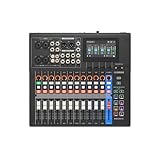
- Tactile Faders, 4.3" touchscreen with 5 control knobs.
- Versatile I/O (New MGX preamps with 86 dB gain range, Bluetooth audio...
- Built-in DSP processor for professional sound and latency-free monitoring.
The Yamaha MGX12 is worth considering when your mixing setup revolves around computers as much as microphones. The supplied listing identifies it as an 18-channel digital mixing console with dual USB-C audio interfaces, making computer connectivity its clearest purchase-fit advantage.
This is a different starting point from choosing a conventional live console solely around motorized faders and monitor buses. A streaming room, teaching space, production desk, or hybrid music setup may benefit more from convenient computer connections than from a large physical control surface.
Dual USB-C connectivity is particularly relevant when more than one computer participates in a production. However, two ports alone do not establish which signals can travel between devices, whether both interfaces operate simultaneously in your intended configuration, or how loopback is routed. Those details should be checked in the current Yamaha manual against your actual signal plan.
The advertised 18-channel figure also needs interpretation. Before buying, separate microphone preamps from stereo sources, computer returns, and processed mixing channels. Someone recording several microphones simultaneously has different requirements from someone combining a few microphones with playback and conferencing audio.
Its limitation is therefore not simply size: it is the risk of selecting it for a workflow that requires capabilities the channel-count headline does not describe. Independent monitor mixes, physical outputs, recording sends, and control behavior all matter.
Position the MGX12 as a connectivity-focused purchase rather than assuming it replaces every similarly sized live-sound console. Check Yamaha Professional Audio’s current US documentation and authorized-dealer stock before committing, especially where operating-system support affects the installation.
Verdict: Shortlist MGX12 for computer-centered music production and streaming. For band sound, confirm its microphone-input and monitor-output requirements first rather than buying on the 18-channel designation alone.
Yamaha MGX12V 18ch Digital Mixing Console

- Tactile Faders, 4.3" touchscreen with 5 control knobs.
- Versatile I/O (New MGX preamps with 86 dB gain range, Bluetooth audio...
- Built-in DSP processor for professional sound and latency-free monitoring.
The Yamaha MGX12V targets buyers who need audio mixing alongside video-related computer connectivity. Its supplied listing describes an 18-channel digital console with dual USB-C audio/video interfacing, distinguishing it from an audio-only purchase.
That makes it relevant to presenters, educators, performers, and small production teams building a streaming workstation. When a production combines microphones, computer playback, and a video source, integrated connectivity can reduce the number of separate devices in the signal chain.
The buying question is whether that integration matches your production format. Do not assume “audio/video interface” means unrestricted video switching, every camera format, or compatibility with every streaming application. Verify supported resolutions, frame rates, connection types, and computer requirements in the current official documentation.
Audio planning remains equally important. An 18-channel mixer does not necessarily provide 18 microphone sockets, 18 isolated recording tracks, or enough independent buses for a full band’s stereo in-ear monitoring. Build a source list before comparing its headline capacity with a stage-oriented console.
The MGX12V’s meaningful limitation is specialization. Video connectivity adds value only when you will actually use it. An audio-only venue may gain more from additional monitor buses, networked stage I/O, or a larger control surface than from integrated video features.
The listing also identifies bundled production software. Treat that as a secondary benefit: confirm license eligibility and supported operating systems, but choose the hardware around routing and connectivity first. Included software cannot compensate for missing physical inputs or outputs.
Verdict: Choose MGX12V when video ingestion and computer-based production are genuine requirements. For an audio-only system, compare the complete workflow before paying for integration that may remain unused.
Yamaha MG10XU 10-Input Stereo Mixer with Effects

- 10 channel mixer with USB and SPX digital effects
- Featuring studio grade discrete class A D PRE amps with inverted Darlington...
- 3 band EQ and high pass filters give you maximum control and eliminate...
The Yamaha MG10XU is an analog mixer, not a digital mixing console. It belongs here as an alternative for buyers whose requirements are simpler than the topic’s digital shortlist suggests.
Its strongest argument is straightforward operation. Physical controls provide immediate access to gain, equalization, and sends, without navigating touchscreen pages or fader layers. For a small presentation system, rehearsal setup, or basic performance rig, that simplicity may matter more than extensive routing.
Yamaha’s MG Series specifications identify the MG10XU as a 10-channel mixer with four microphone inputs, onboard SPX effects, and a 2-in/2-out USB audio interface. Its D-PRE microphone preamps should not be confused with the digitally recallable D-PRE implementation associated with Yamaha’s TF Series.
The USB connection is the main recording caveat. It handles stereo audio rather than providing a separate computer recording channel for every connected source. You can capture a mix, but you cannot assume that every microphone will arrive on its own DAW track.
It also lacks digital scene recall, motorized faders, and Dante expansion. That makes it less suitable for productions with frequent configuration changes, detailed recall requirements, or networked stageboxes.
Within this selection, it occupies the budget-friendly, low-complexity end. Nevertheless, low purchase cost is not automatically good value if you later need an additional interface, more monitor outputs, or a replacement console.
Verdict: Choose MG10XU when simple hands-on mixing and stereo USB recording meet the entire requirement. Skip it if you need isolated multitrack recording, repeatable digital scenes, or extensive independent monitor mixes.
Choosing the Right Yamaha Digital Mixer
Input Capacity
Count actual sources: vocal microphones, drum microphones, instrument feeds, playback, and guest inputs. Stereo keyboards generally require two signal paths. Searches for a “16-channel” or “24-channel” Yamaha mixer should begin with this source list, not fader count.
For larger hands-on alternatives, Yamaha TF1, TF3, and TF5 provide 16, 24, and 32 local microphone inputs respectively, but process 40 input channels. Their TouchFlow Operation and recallable D-PRE preamps suit operators prioritizing accessible controls. See Yamaha’s TF Series specifications.
Monitor-Mix Capacity
Input count does not determine monitor capacity. Four independent stereo in-ear mixes typically require eight bus paths, plus suitable physical outputs. Allow separately for effects sends, fills, and other destinations. Check whether buses can be configured as the stereo pairs your performers require.
Dante Expansion
Dante becomes worthwhile when remote stage I/O, shared audio, or longer cable runs simplify the system. Verify stagebox generation, sample rate, firmware, and preamp control individually. An Ethernet connector may carry control data without supporting Dante audio.
Multitrack Recording
USB stereo recording captures a finished mix; a multichannel interface can send individual sources to recording software. DM3 offers 18-in/18-out USB, while TF consoles provide 34-in/34-out USB connectivity. Confirm driver, operating-system, and DAW compatibility before buying a computer-dependent recording setup.
FAQ
Are analog or digital mixers better?
Neither is universally better. Analog mixers offer direct controls and a relatively straightforward learning curve. Digital mixers add scene recall, flexible routing, integrated processing, and often multitrack connectivity. Choose according to operational complexity, repeatability, recording requirements, and the amount of training available—not assumptions about one format always sounding better.
What was the first digital mixer released by Yamaha?
Yamaha’s official digital-mixer history dates its first digital mixer to 1987. It introduced programmable digital mixing before the company’s later expansion into widely adopted studio and live-production consoles. Historical comparisons should distinguish that first release from subsequent models that made digital mixing more accessible or commercially influential.
Which Yamaha surround sound system is the best?
Home-theater surround systems and professional mixing consoles serve different purposes. A surround system reproduces entertainment through multiple speakers; a mixer combines and routes audio sources. For home cinema, assess room size, speaker layout, format support, and television connectivity rather than using live-sound console specifications as buying criteria.
Conclusion
A well-chosen digital mixer should make a production easier to operate, expand, and repeat reliably. Start with sources and monitor mixes, then confirm recording paths, network compatibility, and physical controls. Planning the complete system—not just the console—helps avoid expensive workarounds and delivers a setup that fits the way you actually work.