What is a USB Mixer?
A USB mixer is an essential piece of gear for anyone serious about audio production. It serves as a bridge between traditional analog mixing and modern digital recording, combining the functions of an audio interface and an audio mixer into one compact unit. This allows for seamless connectivity between multiple audio sources, such as microphones, instruments, and drum machines, directly to your computer via USB.
You might find a USB mixer indispensable if you’re a musician, podcaster, or content creator aiming to record high-quality audio from various sources. It’s particularly beneficial for live performances, where capturing the energy of the moment is crucial, as well as for podcasts and music productions that require the flexibility to control and mix multiple audio inputs. The Mackie Onyx is often recommended for its quality and features, making it a solid choice for those needing a reliable mixer.
Moreover, USB mixers are equipped with features that enhance audio quality, such as high-quality preamps and converters that ensure your recordings sound good and professional. They often offer more channels than a standard audio interface, providing the ability to manage individual tracks more effectively. The Tascam Model is noted for its balance between digital and analog functionalities and its practical uses in live and studio settings. Whether you’re looking to record a band, a podcast with multiple guests, or simply want to future-proof your home studio setup, a USB mixer is a better choice for combining the analog warmth with digital convenience.
Types of USB Mixers
When selecting a USB mixer, it’s important to understand the different types available and how they can impact your audio production. Each type has its own unique benefits and can cater to various needs, whether you’re looking for warmth, flexibility, or a combination of both.
Analog Mixers
Analog mixers are renowned for their warm, vintage sound, as they use analog circuitry to process audio signals. They are favored by those who appreciate a classic audio experience and are often used in live performances where the analog warmth can enhance the sound quality. Analog mixers typically have a straightforward interface with physical knobs and faders, making them user-friendly for those who prefer tactile control.
Digital Mixers
Digital mixers utilize digital signal processing, offering more features and flexibility compared to their analog counterparts. They often include built-in effects, such as reverb and compression, and provide the ability to save settings and presets for quick recall. Digital mixers are ideal for complex productions where precision and versatility are required, as they allow for detailed control over each sound element.
Hybrid Mixers
Hybrid mixers combine the best of both worlds, integrating analog and digital technologies to deliver a unique sound and feature set. Hybrid mixers offer the warmth of analog sound with the advanced capabilities of digital processing. They are perfect for producers who want the flexibility of digital features while maintaining the classic analog sound quality.
Key Features to Consider in USB Mixer
When choosing a USB multitrack mixer, several key features can significantly impact your audio production experience. Here are some of the most important ones to keep in mind:
- Analog Mixer Quality: The quality of the analog preamps and the overall build quality of the mixer are crucial. High-quality analog preamps ensure that your recordings sound good, capturing the warmth and detail of your audio sources without introducing noise or distortion. A robust build quality means your mixer can withstand regular use, whether in a studio or on the road.
- Multitrack Recording Capabilities: If you plan to record multiple audio sources simultaneously, ensure the mixer supports multitrack recording. This feature allows you to capture each input as an individual track, providing greater flexibility during the mixing and editing process. Look for a mixer with enough channels to accommodate your current and future needs, as more channels can help future-proof your setup.
- MIDI Connectivity: For those using drum machines or other MIDI devices, MIDI connectivity is a must. This feature allows you to sync and control your MIDI gear directly from the mixer, streamlining your workflow and enhancing your creative possibilities.
- SD Card Recording: Some mixers offer the ability to record directly to an SD card in addition to USB recording. This feature provides a convenient backup option, ensuring your recordings are safe even if something goes wrong with your computer.
- Individual Tracks: Opt for a mixer that allows you to record individual tracks rather than just a stereo mix. This capability is essential for detailed editing and mixing, giving you more control over each element of your audio production.
- More Channels: Consider choosing a mixer with more channels than you currently need. This approach can help future-proof your setup, allowing you to expand your audio production capabilities without needing to upgrade your mixer in the near future.
- Sound Quality: The overall sound quality of the mixer is paramount. Look for mixers with a reputation for excellent audio performance, and read reviews from other users to gauge how the mixer performs in real-world scenarios. High-quality sound ensures your recordings are clear, detailed, and professional.
Top USB Mixers
Allen & Heath ZED-24

- DuoPre XLR Microphone preamps, including 48V Phantom power for condenser...
- A 100Hz High Pass Filter on every mono input allows unneeded low...
- Two ‘Pre-Fade’ Auxiliary outputs enable separate mixes to be sent to...
The Allen & Heath ZED-24 is a robust analog mixer that has earned a reputation for its exceptional build quality and versatile functionality. It is an excellent choice for musicians, bands, and live sound engineers who require a reliable and high-performance mixing solution. This mixer is equipped with 24 channels, providing ample input options for complex setups involving multiple microphones, instruments, and audio sources.
One of the standout features of the ZED-24 is its high-quality preamps, which ensure that your audio signals are captured with clarity and precision. The mixer also includes a USB interface, allowing for seamless integration with your computer for both recording and playback. This makes it a great option for those looking to combine analog warmth with the convenience of digital recording.
In addition to its impressive sound quality, the Allen & Heath ZED-24 offers a range of onboard effects and processing capabilities. Users can easily apply EQ, reverb, and other effects to enhance their sound during live performances or recording sessions. The mixer’s intuitive layout, with its tactile knobs and faders, provides users with precise control over their audio mix, making it an ideal choice for those who appreciate hands-on interaction with their gear.
Furthermore, the ZED-24 is built with durability in mind, featuring a rugged construction that can withstand the demands of frequent use in live environments. Its robust design ensures that it remains a reliable component of any audio setup, whether used in a studio or on the road.
Overall, the Allen & Heath ZED-24 is a versatile and powerful analog mixer that combines high-quality audio performance with user-friendly features, making it an excellent choice for both beginners and seasoned audio professionals.
YAMAHA MG10XU 10-Input Stereo Mixer with Effects

- 10 channel mixer with USB and SPX digital effects
- Featuring studio grade discrete class A D PRE amps with inverted Darlington...
- 3 band EQ and high pass filters give you maximum control and eliminate...

Yamaha MG10XU is a compact yet powerful analog mixer that offers a perfect blend of high-quality audio performance and user-friendly features. This mixer is ideal for those who need a reliable solution for small to medium-sized audio setups, whether in a home studio, live performance, or podcasting environment.
The MG10XU comes equipped with 10 channels, providing ample connectivity for a variety of audio sources, including microphones, instruments, and line-level devices. It features Yamaha’s renowned D-PRE preamps, which deliver a natural and transparent sound, ensuring that your recordings and live performances sound good and professional. The inclusion of high-quality preamps makes it an excellent choice for capturing vocals and instruments with clarity and precision.
One of the standout features of the MG10XU is its built-in digital effects processor, which includes a range of effects such as reverb, delay, and modulation. These effects can be easily applied to individual channels, allowing users to enhance their sound and add creative flair to their mixes. The mixer also offers USB connectivity, enabling seamless integration with your computer for recording and playback, making it a versatile tool for both live and studio applications.
In addition to its impressive audio quality, the Yamaha MG10XU is designed with durability in mind, featuring a robust metal chassis that can withstand the rigors of regular use. Its compact size and lightweight design make it easy to transport, making it a great option for mobile setups and live performances.
Overall, the Yamaha MG10XU is a versatile and reliable analog mixer that combines high-quality audio performance with user-friendly features, making it an excellent choice for musicians, podcasters, and audio professionals looking for a compact yet powerful mixing solution.
Alesis MultiMix 8 USB FX

- Eight-channel mixer with mic, line, and guitar-level inputs; 16-bit...
- XLR inputs with gain trim, switchable high-pass filters, and 48V phantom...
- 1/4-inch line-level inputs for instruments and high-impedance guitar input...
Alesis MultiMix 8 is a highly versatile USB mixer that offers a comprehensive set of features for both live and studio applications. Designed to cater to musicians, podcasters, and audio enthusiasts, this mixer combines the ease of analog mixing with the convenience of digital connectivity. The Tascam Model is another versatile option that offers unique features like MIDI connectivity and the ability to act as a master clock for recording.
With 8 input channels, the MultiMix 8 provides ample connectivity for a variety of audio sources, including microphones, instruments, and line-level devices. Its built-in preamps ensure high-quality audio capture, delivering clear and natural sound reproduction. This makes it ideal for recording vocals, guitars, and other instruments with precision and clarity.
One of the standout features of the Alesis MultiMix 8 is its integrated digital effects processor. It offers a range of effects such as reverb, delay, and chorus, which can be applied to individual channels to enhance your sound. This feature allows users to add creative flair to their mixes without the need for additional external equipment.
The MultiMix 8 also includes a USB interface, enabling seamless integration with your computer for both recording and playback. This makes it a perfect choice for those looking to combine analog warmth with the convenience of digital recording. The USB connectivity allows for easy multitrack recording, capturing each input as an individual track in your Digital Audio Workstation (DAW).
In addition to its impressive audio capabilities, the Alesis MultiMix 8 is built with durability in mind. Its robust construction ensures it can withstand the demands of regular use, whether in a studio or on the road. The mixer’s intuitive layout, with tactile knobs and faders, provides users with precise control over their audio mix, making it user-friendly for both beginners and experienced audio professionals.
Overall, the Alesis MultiMix 8 is a reliable and powerful USB mixer that offers high-quality audio performance and a range of features to suit a variety of audio production needs. Whether you’re recording a podcast, producing music, or performing live, this mixer provides the tools you need to achieve professional-level results.
Numark M6 USB – 4-Channel DJ Mixer with Built-In Audio Interface

- Versatile, Feature packed - Four-channel DJ mixer featuring must-have mix...
- Connectivity Covered - Multiple phono, line and mic inputs, plus master...
- Mix Control - Four channels outfitted with a replaceable crossfader...
Numark M6 USB is a versatile and affordable mixer that caters to DJs and audio enthusiasts looking for a reliable solution for both live and studio applications. This mixer combines the functionality of a traditional analog mixer with the convenience of USB connectivity, making it an ideal choice for those who want to integrate digital audio sources with their setup.
Featuring four channels, the Numark M6 USB provides ample connectivity options for a variety of audio sources, including turntables, CD players, and other line-level devices. Each channel is equipped with a three-band EQ, allowing users to fine-tune their sound and achieve the desired tonal balance. The mixer also includes a microphone input with dedicated EQ and gain controls, making it suitable for vocal performances and announcements.
One of the standout features of the Numark M6 USB is its USB connectivity, which allows users to connect the mixer directly to their computer for recording and playback. This feature makes it easy to record DJ sets, live performances, or studio sessions directly into a Digital Audio Workstation (DAW), providing a seamless integration between analog and digital audio sources. The USB connection also enables users to play music from their computer through the mixer, offering additional flexibility for live performances and events.
Mackie ProFXv3 Series 16-Channel Professional Effects Mixer with USB
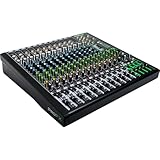
- Fits bands and venues that need 16 channels without a digital learning...
- Mix the room and record the multitrack at the same time
- Onyx Preamps: 60 dB of clean gain on every mic channel
Despite the fact that the USB causes at least 63 dB of hissing noise, we nevertheless give the mixer a high rating for its live performance potential. Excellent sound quality is dependent not just on the noise floor, but also on the frequency system, cables, and other factors. The Mackie Mixer is specifically built for live vocal, instrumental, and band performance, with a large number of channels, improved microphone preamps, and instrument inputs.
A 3-band EQ with adjustable center frequency and a 7-band graphic EQ for running or monitoring outputs are included in this mixing console. In addition, behind each channel’s EQ is a 100Hz low-cut filter that removes low frequencies and polishes the live audio stream. Some critics even claim that Mackie is the best mixer for small venues, and given how affordable it is, they may be true. Many individuals are delighted with the return on investment they received from this mixer in terms of price.
The 16-line inputs make connecting keyboards, samplers, and other gear on the fly a breeze. The Mackie’s built-in interface also implies that it is capable of handling multiple artists without slowing down or hurting the sound quality.
Using a USB Mixer for Multitrack Recording
Using a USB mixer for multitrack recording is an excellent way to capture high-quality audio without breaking the bank. Here are some tips to help you get the most out of your USB mixer:
Connect Your Instruments
Start by connecting your instruments to the mixer using the appropriate cables, such as XLR or 1/4” cables, depending on the type of instrument and the mixer’s inputs. Ensure all connections are secure to avoid any signal loss or interference.
Set Your Levels
Carefully set your input levels to ensure that your signals are strong and clear but not too hot. Proper level setting helps prevent clipping and distortion, ensuring your recordings sound good.
Choose Your Recording Mode
Select the recording mode that best suits your needs. Some mixers allow you to record individual tracks, while others only offer a stereo mix. Recording individual tracks provides greater flexibility during the mixing and editing process.
Monitor Your Audio
Continuously monitor your audio to ensure it sounds good and is free from noise and distortion. Use headphones or studio monitors to check the quality of your recordings in real-time.
Reference Your Tracks
Regularly reference your tracks to ensure they are sounding good. Make any necessary adjustments to levels, EQ, or effects to achieve the desired sound. Referencing helps maintain consistency and quality throughout your recording session.
Record to an SD Card
Consider recording to an SD card in addition to USB. This provides a convenient backup option, ensuring your recordings are safe even if something goes wrong with your computer. SD card recording can also be useful for quick transfers and playback on other devices.